|
| 1 | +--- |
| 2 | +title: Elastic 技术栈之 Filebeat |
| 3 | +date: 2017-01-03 |
| 4 | +categories: |
| 5 | +- javatool |
| 6 | +tags: |
| 7 | +- java |
| 8 | +- javatool |
| 9 | +- log |
| 10 | +- elastic |
| 11 | +--- |
| 12 | + |
| 13 | +# Elastic 技术栈之 Filebeat |
| 14 | + |
| 15 | +## 简介 |
| 16 | + |
| 17 | +Beats 是安装在服务器上的数据中转代理。 |
| 18 | + |
| 19 | +Beats 可以将数据直接传输到 Elasticsearch 或传输到 Logstash 。 |
| 20 | + |
| 21 | +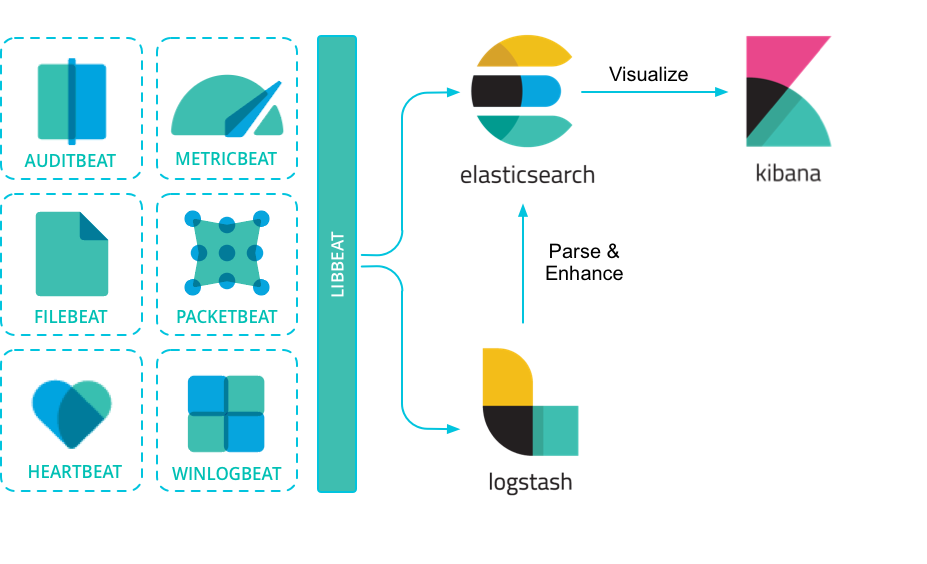 |
| 22 | + |
| 23 | +Beats 有多种类型,可以根据实际应用需要选择合适的类型。 |
| 24 | + |
| 25 | +常用的类型有: |
| 26 | + |
| 27 | +- **Packetbeat:**网络数据包分析器,提供有关您的应用程序服务器之间交换的事务的信息。 |
| 28 | +- **Filebeat:**从您的服务器发送日志文件。 |
| 29 | +- **Metricbeat:**是一个服务器监视代理程序,它定期从服务器上运行的操作系统和服务收集指标。 |
| 30 | +- **Winlogbeat:**提供Windows事件日志。 |
| 31 | + |
| 32 | +> **参考** |
| 33 | +> |
| 34 | +> 更多 Beats 类型可以参考:[community-beats](https://www.elastic.co/guide/en/beats/libbeat/current/community-beats.html) |
| 35 | +> |
| 36 | +> **说明** |
| 37 | +> |
| 38 | +> 由于本人工作中只应用了 FileBeat,所以后面内容仅介绍 FileBeat 。 |
| 39 | +
|
| 40 | +### FileBeat 的作用 |
| 41 | + |
| 42 | +相比 Logstash,FileBeat 更加轻量化。 |
| 43 | + |
| 44 | +在任何环境下,应用程序都有停机的可能性。 Filebeat 读取并转发日志行,如果中断,则会记住所有事件恢复联机状态时所在位置。 |
| 45 | + |
| 46 | +Filebeat带有内部模块(auditd,Apache,Nginx,System和MySQL),可通过一个指定命令来简化通用日志格式的收集,解析和可视化。 |
| 47 | + |
| 48 | +FileBeat 不会让你的管道超负荷。FileBeat 如果是向 Logstash 传输数据,当 Logstash 忙于处理数据,会通知 FileBeat 放慢读取速度。一旦拥塞得到解决,FileBeat 将恢复到原来的速度并继续传播。 |
| 49 | + |
| 50 | +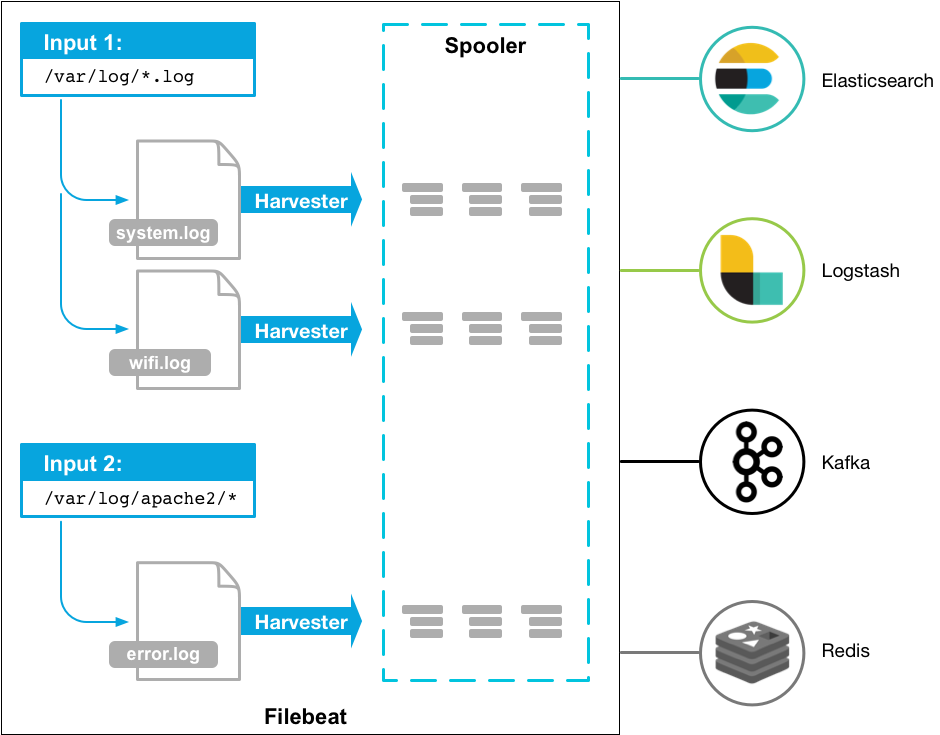 |
| 51 | + |
| 52 | +## 安装 |
| 53 | + |
| 54 | +Unix / Linux 系统建议使用下面方式安装,因为比较通用。 |
| 55 | + |
| 56 | +``` |
| 57 | +wget https://artifacts.elastic.co/downloads/beats/filebeat/filebeat-6.1.1-linux-x86_64.tar.gz |
| 58 | +tar -zxf filebeat-6.1.1-linux-x86_64.tar.gz |
| 59 | +``` |
| 60 | + |
| 61 | +> **参考** |
| 62 | +> |
| 63 | +> 更多内容可以参考:[filebeat-installation](https://www.elastic.co/guide/en/beats/filebeat/current/filebeat-installation.html) |
| 64 | +
|
| 65 | +## 配置 |
| 66 | + |
| 67 | +### 配置文件 |
| 68 | + |
| 69 | +首先,需要知道的是:`filebeat.yml` 是 filebeat 的配置文件。配置文件的路径会因为你安装方式的不同而变化。 |
| 70 | + |
| 71 | +Beat 所有系列产品的配置文件都基于 [YAML](http://www.yaml.org/) 格式,FileBeat 当然也不例外。 |
| 72 | + |
| 73 | +filebeat.yml 部分配置示例: |
| 74 | + |
| 75 | +```yaml |
| 76 | +filebeat: |
| 77 | + prospectors: |
| 78 | + - type: log |
| 79 | + paths: |
| 80 | + - /var/log/*.log |
| 81 | + multiline: |
| 82 | + pattern: '^[' |
| 83 | + match: after |
| 84 | +``` |
| 85 | +
|
| 86 | +> **参考** |
| 87 | +> |
| 88 | +> 更多 filebeat 配置内容可以参考:[配置 filebeat](https://www.elastic.co/guide/en/beats/filebeat/current/configuring-howto-filebeat.html) |
| 89 | +> |
| 90 | +> 更多 filebeat.yml 文件格式内容可以参考:[filebeat.yml 文件格式](https://www.elastic.co/guide/en/beats/libbeat/6.1/config-file-format.html) |
| 91 | +
|
| 92 | +### 重要配置项 |
| 93 | +
|
| 94 | +#### filebeat.prospectors |
| 95 | +
|
| 96 | +(文件监视器)用于指定需要关注的文件。 |
| 97 | +
|
| 98 | +**示例** |
| 99 | +
|
| 100 | +```yaml |
| 101 | +filebeat.prospectors: |
| 102 | +- type: log |
| 103 | + enabled: true |
| 104 | + paths: |
| 105 | + - /var/log/*.log |
| 106 | +``` |
| 107 | +
|
| 108 | +#### output.elasticsearch |
| 109 | +
|
| 110 | +如果你希望使用 filebeat 直接向 elasticsearch 输出数据,需要配置 output.elasticsearch 。 |
| 111 | +
|
| 112 | +**示例** |
| 113 | +
|
| 114 | +```yaml |
| 115 | +output.elasticsearch: |
| 116 | + hosts: ["192.168.1.42:9200"] |
| 117 | +``` |
| 118 | +
|
| 119 | +#### output.logstash |
| 120 | +
|
| 121 | +如果你希望使用 filebeat 向 logstash输出数据,然后由 logstash 再向elasticsearch 输出数据,需要配置 output.logstash。 |
| 122 | +
|
| 123 | +> **注意** |
| 124 | +> |
| 125 | +> 相比于向 elasticsearch 输出数据,个人更推荐向 logstash 输出数据。 |
| 126 | +> |
| 127 | +> 因为 logstash 和 filebeat 一起工作时,如果 logstash 忙于处理数据,会通知 FileBeat 放慢读取速度。一旦拥塞得到解决,FileBeat 将恢复到原来的速度并继续传播。这样,可以减少管道超负荷的情况。 |
| 128 | +
|
| 129 | +**示例** |
| 130 | +
|
| 131 | +```yaml |
| 132 | +output.logstash: |
| 133 | + hosts: ["127.0.0.1:5044"] |
| 134 | +``` |
| 135 | +
|
| 136 | +此外,还需要在 logstash 的配置文件(如 logstash.conf)中指定 beats input 插件: |
| 137 | +
|
| 138 | +```yaml |
| 139 | +input { |
| 140 | + beats { |
| 141 | + port => 5044 # 此端口需要与 filebeat.yml 中的端口相同 |
| 142 | + } |
| 143 | +} |
| 144 | + |
| 145 | +# The filter part of this file is commented out to indicate that it is |
| 146 | +# optional. |
| 147 | +# filter { |
| 148 | +# |
| 149 | +# } |
| 150 | + |
| 151 | +output { |
| 152 | + elasticsearch { |
| 153 | + hosts => "localhost:9200" |
| 154 | + manage_template => false |
| 155 | + index => "%{[@metadata][beat]}-%{[@metadata][version]}-%{+YYYY.MM.dd}" |
| 156 | + document_type => "%{[@metadata][type]}" |
| 157 | + } |
| 158 | +} |
| 159 | +``` |
| 160 | + |
| 161 | +#### setup.kibana |
| 162 | + |
| 163 | +如果打算使用 Filebeat 提供的 Kibana 仪表板,需要配置 setup.kibana 。 |
| 164 | + |
| 165 | +**示例** |
| 166 | + |
| 167 | +```yaml |
| 168 | +setup.kibana: |
| 169 | + host: "localhost:5601" |
| 170 | +``` |
| 171 | +
|
| 172 | +#### setup.template.settings |
| 173 | +
|
| 174 | +在 Elasticsearch 中,[索引模板](https://www.elastic.co/guide/en/elasticsearch/reference/6.1/indices-templates.html)用于定义设置和映射,以确定如何分析字段。 |
| 175 | +
|
| 176 | +在 Filebeat 中,setup.template.settings 用于配置索引模板。 |
| 177 | +
|
| 178 | +Filebeat 推荐的索引模板文件由 Filebeat 软件包安装。如果您接受 filebeat.yml 配置文件中的默认配置,Filebeat在成功连接到 Elasticsearch 后自动加载模板。 |
| 179 | +
|
| 180 | +您可以通过在 Filebeat 配置文件中配置模板加载选项来禁用自动模板加载,或加载自己的模板。您还可以设置选项来更改索引和索引模板的名称。 |
| 181 | +
|
| 182 | +> **参考** |
| 183 | +> |
| 184 | +> 更多内容可以参考:[filebeat-template](https://www.elastic.co/guide/en/beats/filebeat/current/filebeat-template.html) |
| 185 | +> |
| 186 | +> **说明** |
| 187 | +> |
| 188 | +> 如无必要,使用 Filebeat 配置文件中的默认索引模板即可。 |
| 189 | +
|
| 190 | +#### setup.dashboards |
| 191 | +
|
| 192 | +Filebeat 附带了示例 Kibana 仪表板。在使用仪表板之前,您需要创建索引模式 `filebeat- *`,并将仪表板加载到Kibana 中。为此,您可以运行 `setup` 命令或在 `filebeat.yml` 配置文件中配置仪表板加载。 |
| 193 | + |
| 194 | +为了在 Kibana 中加载 Filebeat 的仪表盘,需要在 `filebeat.yml` 配置中启动开关: |
| 195 | + |
| 196 | +``` |
| 197 | +setup.dashboards.enabled: true |
| 198 | +``` |
| 199 | +
|
| 200 | +> **参考** |
| 201 | +> |
| 202 | +> 更多内容可以参考:[configuration-dashboards](https://www.elastic.co/guide/en/beats/filebeat/current/configuration-dashboards.html) |
| 203 | +> |
| 204 | +
|
| 205 | +## 命令 |
| 206 | +
|
| 207 | +filebeat 提供了一系列命令来完成各种功能。 |
| 208 | +
|
| 209 | +执行命令方式: |
| 210 | +
|
| 211 | +```sh |
| 212 | +./filebeat COMMAND |
| 213 | +``` |
| 214 | + |
| 215 | +> **参考** |
| 216 | +> |
| 217 | +> 更多内容可以参考:[command-line-options](https://www.elastic.co/guide/en/beats/filebeat/current/command-line-options.html) |
| 218 | +> |
| 219 | +> **说明** |
| 220 | +> |
| 221 | +> 个人认为命令行没有必要一一掌握,因为绝大部分功能都可以通过配置来完成。且通过命令行指定功能这种方式要求每次输入同样参数,不利于固化启动方式。 |
| 222 | +> |
| 223 | +> 最重要的当然是启动命令 run 了。 |
| 224 | +> |
| 225 | +> **示例** 指定配置文件启动 |
| 226 | +> |
| 227 | +> ```sh |
| 228 | +> ./filebeat run -e -c filebeat.yml -d "publish" |
| 229 | +> ./filebeat -e -c filebeat.yml -d "publish" # run 可以省略 |
| 230 | +> ``` |
| 231 | +
|
| 232 | +## 模块 |
| 233 | +
|
| 234 | +Filebeat 提供了一套预构建的模块,让您可以快速实施和部署日志监视解决方案,并附带示例仪表板和数据可视化。这些模块支持常见的日志格式,例如Nginx,Apache2和MySQL 等。 |
| 235 | +
|
| 236 | +### 运行模块的步骤 |
| 237 | +
|
| 238 | +- 配置 elasticsearch 和 kibana |
| 239 | +
|
| 240 | +``` |
| 241 | +output.elasticsearch: |
| 242 | + hosts: ["myEShost:9200"] |
| 243 | + username: "elastic" |
| 244 | + password: "elastic" |
| 245 | +setup.kibana: |
| 246 | + host: "mykibanahost:5601" |
| 247 | + username: "elastic" |
| 248 | + password: "elastic |
| 249 | +``` |
| 250 | +
|
| 251 | +> username 和 password 是可选的,如果不需要认证则不填。 |
| 252 | +
|
| 253 | +- 初始化环境 |
| 254 | +
|
| 255 | +执行下面命令,filebeat 会加载推荐索引模板。 |
| 256 | +
|
| 257 | +``` |
| 258 | +./filebeat setup -e |
| 259 | +``` |
| 260 | +
|
| 261 | +- 指定模块 |
| 262 | +
|
| 263 | +执行下面命令,指定希望加载的模块。 |
| 264 | +
|
| 265 | +``` |
| 266 | +./filebeat -e --modules system,nginx,mysql |
| 267 | +``` |
| 268 | +
|
| 269 | +> **参考** |
| 270 | +> |
| 271 | +> 更多内容可以参考: [配置 filebeat 模块](https://www.elastic.co/guide/en/beats/filebeat/current/configuration-filebeat-modules.html) | [filebeat 支持模块](https://www.elastic.co/guide/en/beats/filebeat/current/filebeat-modules.html) |
| 272 | +
|
| 273 | +## 原理 |
| 274 | +
|
| 275 | +Filebeat 有两个主要组件: |
| 276 | +
|
| 277 | +harvester:负责读取一个文件的内容。它会逐行读取文件内容,并将内容发送到输出目的地。 |
| 278 | +
|
| 279 | +prospector:负责管理 harvester 并找到所有需要读取的文件源。比如类型是日志,prospector 就会遍历制定路径下的所有匹配要求的文件。 |
| 280 | +
|
| 281 | +```yaml |
| 282 | +filebeat.prospectors: |
| 283 | +- type: log |
| 284 | + paths: |
| 285 | + - /var/log/*.log |
| 286 | + - /var/path2/*.log |
| 287 | +``` |
| 288 | +
|
| 289 | +Filebeat保持每个文件的状态,并经常刷新注册表文件中的磁盘状态。状态用于记住 harvester 正在读取的最后偏移量,并确保发送所有日志行。 |
| 290 | +
|
| 291 | +Filebeat 将每个事件的传递状态存储在注册表文件中。所以它能保证事件至少传递一次到配置的输出,没有数据丢失。 |
| 292 | +
|
| 293 | +## 资料 |
| 294 | +
|
| 295 | +[Beats 官方文档](https://www.elastic.co/guide/en/beats/libbeat/current/index.html) |
| 296 | +
|
0 commit comments