You signed in with another tab or window. Reload to refresh your session.You signed out in another tab or window. Reload to refresh your session.You switched accounts on another tab or window. Reload to refresh your session.Dismiss alert
Instead of hard-coding different values to test the same scenario with different test data, you can use Data Driven testing. In Testsigma, you can
29
29
30
-
1.import or read the test data and/or expected output data from external files or data sources, then
30
+
1.Import or read the test data and/or expected output data from external files or data sources, then
31
31
32
-
2.feed this data into your automated test cases so that you don't need to hard-code the test data into the Test Steps definition.
32
+
2.Feed this data into your automated test cases so that you don't need to hard-code the test data into the Test Steps definition.
33
33
34
-
The Test Steps iterates itself and subsequent rows of data are fed to the Test Steps as input.
34
+
The test steps iterates itself and subsequent rows of data are fed to the test steps as input.
35
35
36
36
---
37
37
38
-
> ## [Pre-requisites:](#pre-requisites)
39
-
> 1. You should know [how to create a Test data profile](https://testsigma.com/docs/test-data/create-data-profiles/).
40
-
> 2. You should know [how to add steps using simple English](https://testsigma.com/docs/test-cases/step-types/natural-language/).
38
+
> ## [Prerequisites:](#prerequisites)
41
39
42
-
---
43
-
44
-
## [Step 1: Associate Data Profile with your Test Case](#step-1-associate-data-profile-with-you-test-case)
40
+
> 1. You should know [how to create a test data profile](https://testsigma.com/docs/test-data/create-data-profiles/).
41
+
> 2. You should know [how to create a test case](https://testsigma.com/docs/test-cases/manage/add-edit-delete/).
45
42
46
-
1. In Create/Update Test Case form and click on Show Additional Options.
43
+
---
47
44
48
-
2. Select the Test Data which you have created as shown below.
45
+
## [Step 1: Associate data profile with your test case](#step-1-associate-data-profile-with-you-test-case)
49
46
50
-

47
+
1. In **Create** or **Edit**test case form and click on **Show additional options**.
51
48
52
-
3. Select the Test data profile you want to add to your test cases and enable Data Driven as shown below:
49
+
2. Select the **Test data profile** you want to add to your test cases and enable the toggle **Data Driven** as shown below:
53
50
54
-

51
+

55
52
56
53
Enabling the data-driven toggle will enable the test to run multiple times based on the number of rows available in Test Data Profile. For. If the data profile has 5 rows(sets) the test will run 5 times automatically using each data set(row) everytime.
57
54
58
55
[[info | Note:]]
59
56
| You can also select a specific data set if you want to run only once using data from a specific data set in the profile.
60
57
61
-
---
58
+
If you enable the data driven testing in your test case you can narrow and customize the various data sets from your test data profile that are being used in your test case using the filters *iteration*, *parameter*, *set name*.
62
59
63
-
## [Step 2: Use Parameter names in Test Case](#step-2-use-parameter-names-in-test-case)
60
+
* Iteration: This type of filtering is applicable only to sequential data sets. The data sets can be filtered using the filter operations greater than,less than, or between.
64
61
65
-
1. Back in your test cases, while creating test steps, remove “test data” and select @|Parameter| from the drop down as shown below:
62
+
* Set name: This type of filtering is applicable for non sequential data sets. Here the data sets are filtered by data set names using the operations between, equals, contains, starts with, ends with. Any data set names containing the set name or part of it are used in the test case.
66
63
67
-

64
+
* Parameter:This type of filtering is applicable for non sequential data sets. Here the data sets are filtered using parameters used in data sets.
68
65
69
-
2. Now delete the “testdata“ placeholder and choose Parameter from the drop-down options

68
+
Refer to the below GIF on how to associate a test data profile to a test case
72
69
73
-
3. Now an overlay will open with all available parameters in the data profile.
70
+

71
+
72
+
73
+
---
74
74
75
-

75
+
## [Step 2: Use parameter names in test case](#step-2-use-parameter-names-in-test-case)
76
+
77
+
1. Back in your test cases, while creating test steps, click on *test data* and select *@|Parameter|* from the drop down as shown below:
78
+
79
+

80
+
81
+
2. Now an overlay will open with all available parameters in the data profile.
82
+
83
+

76
84
77
85
Now, your test case will use the parameter value from your test data profile.
78
86
87
+
Refer to the below GIF on how to use parameter names in test cases
88
+

89
+
79
90
---
80
91
81
92
## [Step 3: Run Data Driven Test Case](#step-3-run-data-driven-test-case)
@@ -85,4 +96,3 @@ Now, your test case will use the parameter value from your test data profile.
85
96
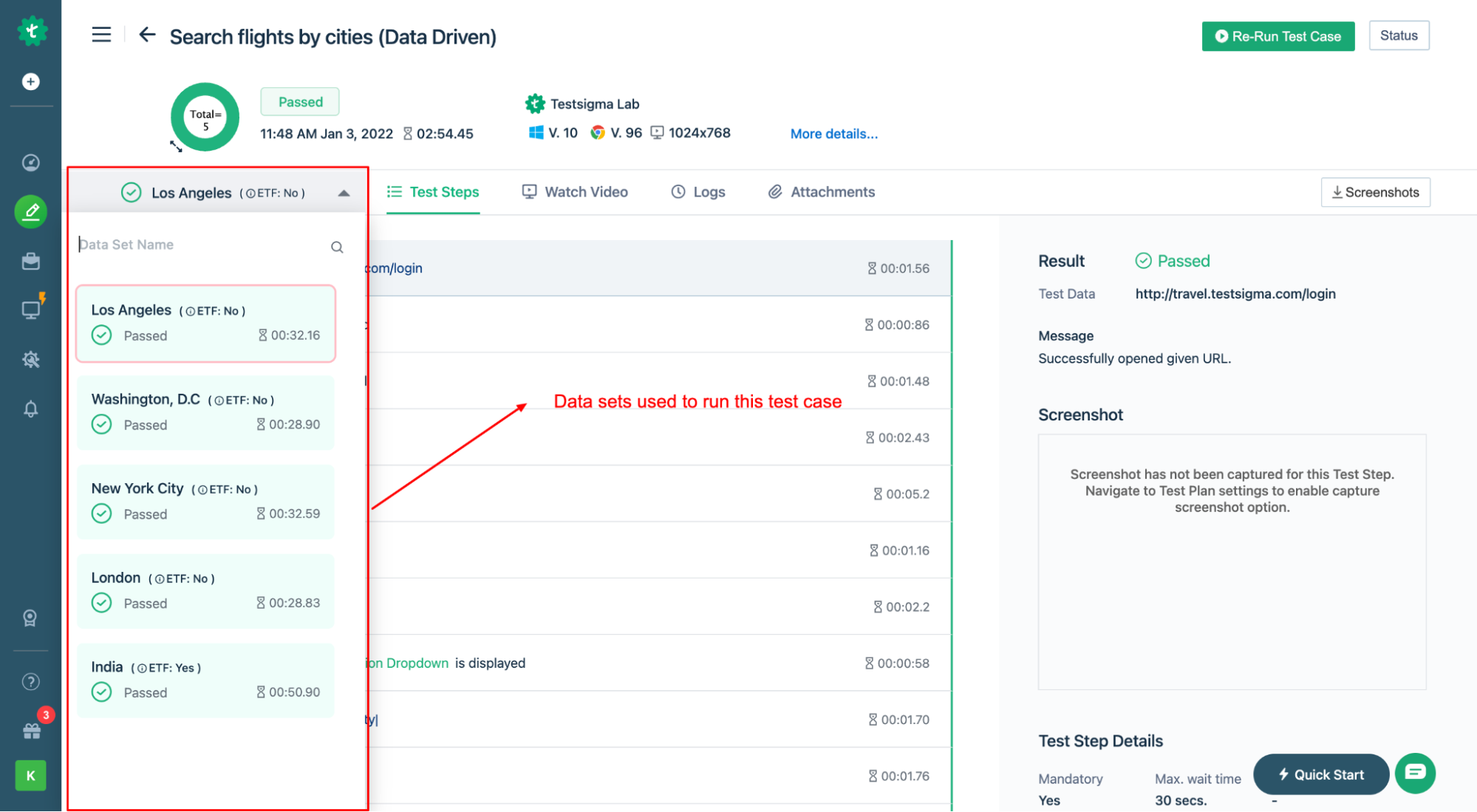
2. Once the test run is complete you will get results for each of the data sets. Like in the screenshot below:
86
97
87
98
0 commit comments