You signed in with another tab or window. Reload to refresh your session.You signed out in another tab or window. Reload to refresh your session.You switched accounts on another tab or window. Reload to refresh your session.Dismiss alert
Copy file name to clipboardExpand all lines: src/pages/tutorials/addons/how-create-addons-actions.md
+1-1Lines changed: 1 addition & 1 deletion
Display the source diff
Display the rich diff
Original file line number
Diff line number
Diff line change
@@ -1,6 +1,6 @@
1
1
---
2
2
title: "How to create addon for actions"
3
-
metadesc: "End to end tutorial on how to create an add-on for automation action"
3
+
metadesc: "Extend test automation for complex scenarios with a simple task in Testsigma using add-ons. Learn how to create and use an add-on for a simple PDF action."
Copy file name to clipboardExpand all lines: src/pages/tutorials/addons/how-create-addons-conditional-if.md
+1-1Lines changed: 1 addition & 1 deletion
Display the source diff
Display the rich diff
Original file line number
Diff line number
Diff line change
@@ -1,6 +1,6 @@
1
1
---
2
2
title: "How to add condition if actions"
3
-
metadesc: "End to end tutorial on how to create an add-on for Conditional If action"
3
+
metadesc: "End to end tutorial on how to create an add-on for Conditional If action | Learn how to build an Action that can be used as a conditional test step in Testsigma"
Copy file name to clipboardExpand all lines: src/pages/tutorials/addons/how-create-addons-test-data-generators.md
+2-2Lines changed: 2 additions & 2 deletions
Display the source diff
Display the rich diff
Original file line number
Diff line number
Diff line change
@@ -1,6 +1,6 @@
1
1
---
2
2
title: "Create Test data generators in Addons"
3
-
metadesc: ""
3
+
metadesc: "Data generators are very useful to automate scenarios that require several test data values & inputs. Learn how to create a data generator add-on in Testsigma"
4
4
noindex: false
5
5
order: 6.2
6
6
page_id: "Create Test data generators in Addons"
@@ -30,7 +30,7 @@ contextual_links:
30
30
---
31
31
---
32
32
33
-
Data generators are very useful utilities to automate scenarios that require several test data values & inputs. In this tutorial we show you how to create a data generator add-on in Testsigma
33
+
Data generators are very useful utilities to automate scenarios that require several test data values & inputs. In this tutorial we show you how to create a data generator add-on in Testsigma.
Copy file name to clipboardExpand all lines: src/pages/tutorials/addons/how-create-addons-while-loops.md
+1-1Lines changed: 1 addition & 1 deletion
Display the source diff
Display the rich diff
Original file line number
Diff line number
Diff line change
@@ -1,6 +1,6 @@
1
1
---
2
2
title: "How to add While actions "
3
-
metadesc: "End to end tutorial on how to create an add-on for WHILE conditional action"
3
+
metadesc: "End to end tutorial on how to create an add-on for WHILE conditional action. Learn how to build an action that can be used as a conditional test step."
Copy file name to clipboardExpand all lines: src/pages/tutorials/advanced/email-based-two-factor-authentication.md
+1-1Lines changed: 1 addition & 1 deletion
Display the source diff
Display the rich diff
Original file line number
Diff line number
Diff line change
@@ -1,6 +1,6 @@
1
1
---
2
2
title: "How to automate email based Two Factor Authentication(2FA)"
3
-
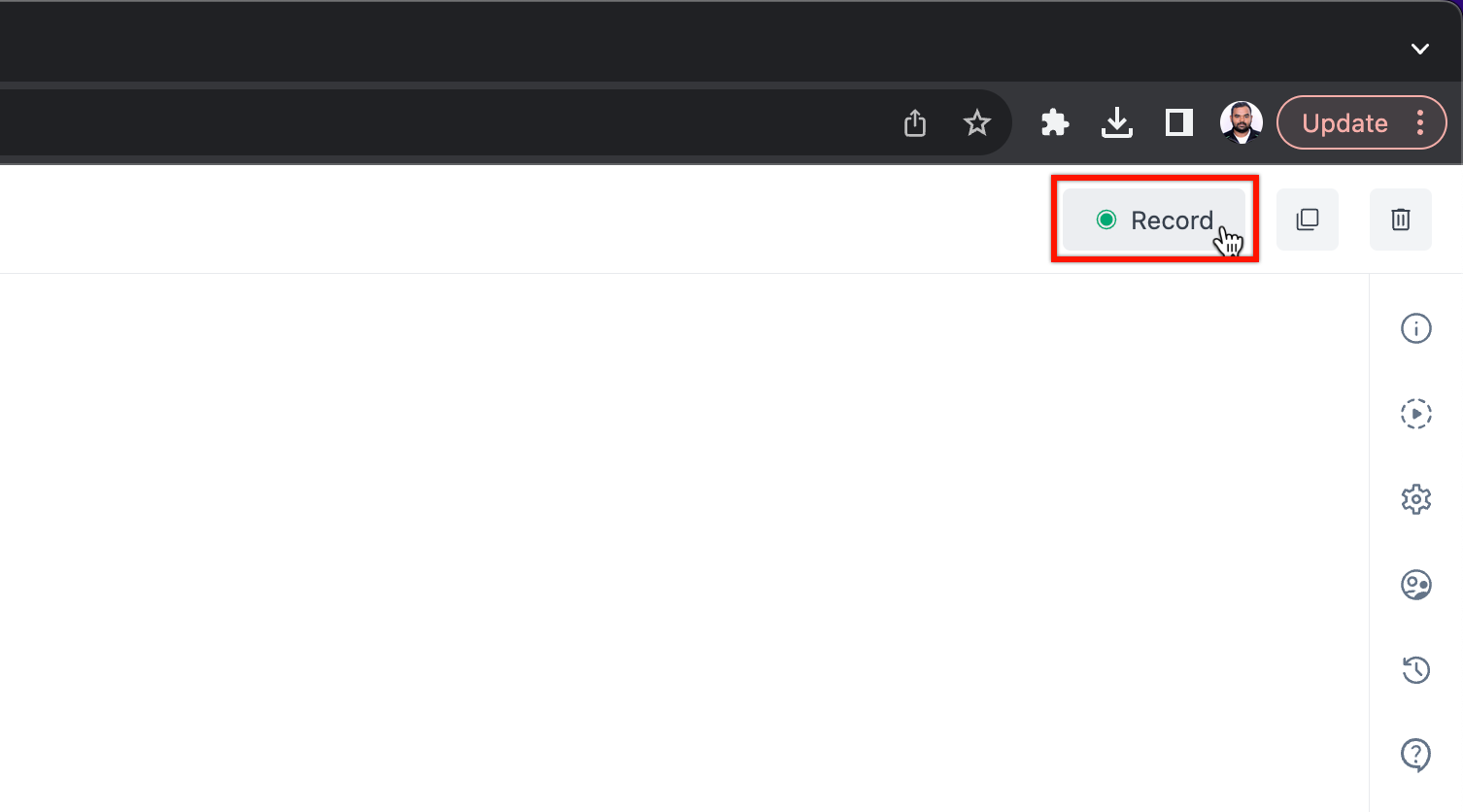
metadesc: "Coming soon..."
3
+
metadesc: "This tutorial discusses steps in detail for email based 2FA automation. Learn how to automate email based Two Factor Authentication(2FA) in Testsigma"
4
4
noindex: false
5
5
order: 5.3
6
6
page_id: "How to automate email based Two Factor Authentication(2FA)"
Copy file name to clipboardExpand all lines: src/pages/tutorials/advanced/sms-based-two-factor-authentication-2fa.md
+1-1Lines changed: 1 addition & 1 deletion
Display the source diff
Display the rich diff
Original file line number
Diff line number
Diff line change
@@ -1,6 +1,6 @@
1
1
---
2
2
title: "How to automate SMS based two factor authentication(2FA)"
3
-
metadesc: "Coming soon..."
3
+
metadesc: "This tutorial discusses steps in detail for sms based 2FA automation. Learn how to automate sms based Two Factor Authentication(2FA) in Testsigma"
4
4
noindex: false
5
5
order: 5.2
6
6
page_id: "How to automate SMS based Two Factor Authentication(2FA)"
Copy file name to clipboardExpand all lines: src/pages/tutorials/getting-started/automate-android-applications.md
+20-20Lines changed: 20 additions & 20 deletions
Display the source diff
Display the rich diff
Original file line number
Diff line number
Diff line change
@@ -1,6 +1,6 @@
1
1
---
2
2
title: "Get Started with Automating Android Apps"
3
-
metadesc: "A quick Tutorial to help you with your first steps to testing an android app using Testsigma"
3
+
metadesc: "This quick tutorial discusses in detail on how to create basic tests for an android application using Mobile Test Recorder in Testsigma Application."
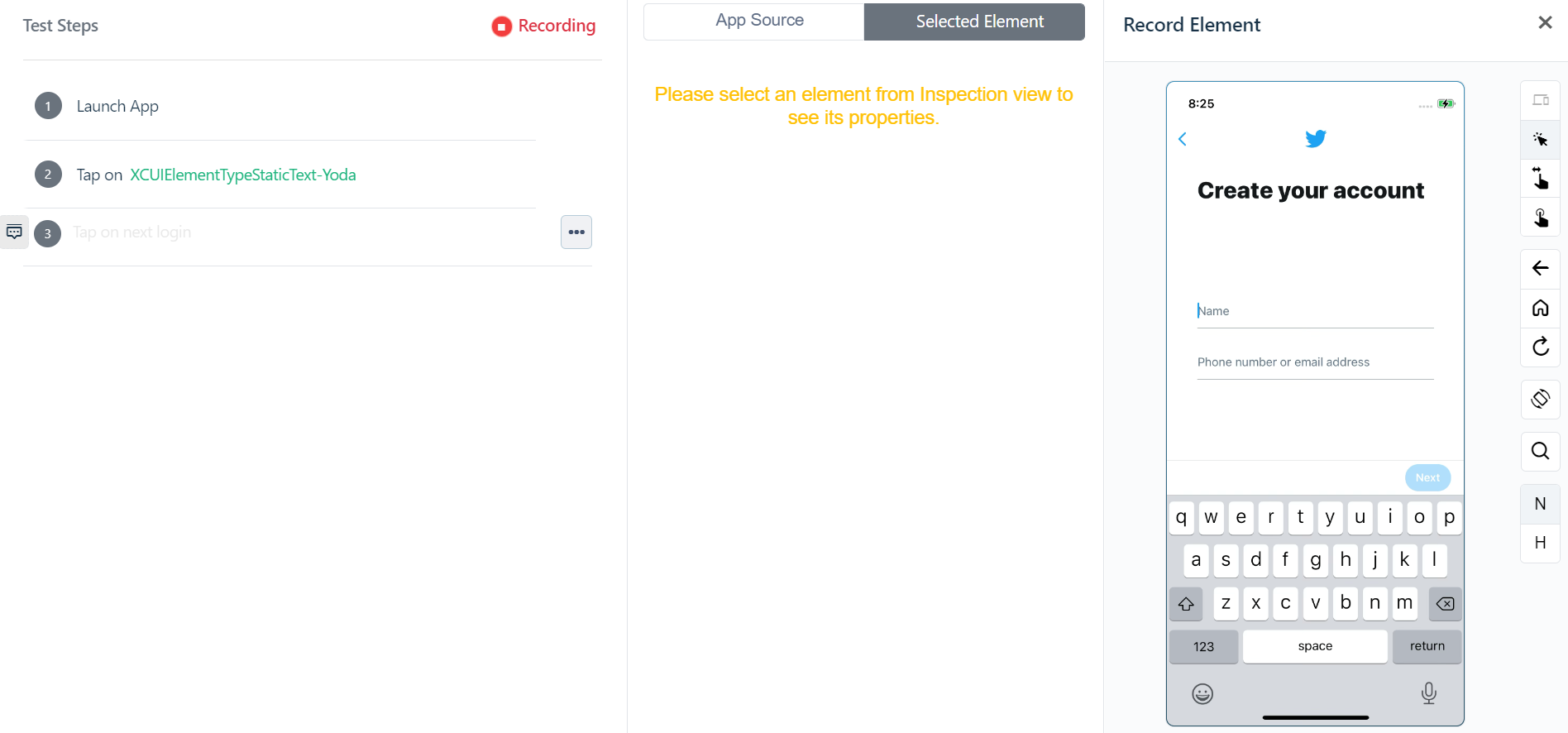
4
4
noindex: false
5
5
order: 1.3
6
6
page_id: "Get Started with Automating Android Apps"
@@ -88,10 +88,10 @@ These projects (here, Android application) will also have a few sample Test Case
88
88
1. Start by creating a Project first.
89
89
For a detailed overview, check [here](https://testsigma.com/docs/projects/overview/)
90
90
91
-
2. Create a Test Case
91
+
2. Create a Test Case.
92
92
For a detailed overview, check [here](https://testsigma.com/docs/test-cases/overview/)
93
93
94
-
3. Add Test Steps
94
+
3. Add Test Steps.
95
95
Once you create a Test Case, you will be redirected to the page where you can add all your Test Steps.
96
96
97
97
Here’s a video that explains all the steps discussed so far.
@@ -102,9 +102,9 @@ The next section explains how you can add steps to test a sample scenario.
102
102
**Sample Test Scenario:** We will be using a sample login test scenario using the wordpress app where the user taps on login, enters an email ID and is sent a magic login link.
103
103
104
104
There are two ways you can add Test Steps to your Test Case:
105
-
1. Add/Record Test Steps using the Test Recorder
105
+
1. Add/Record Test Steps using the Test Recorder.
106
106
107
-
2. Writing your tests step by step in simple English language
107
+
2. Writing your tests step by step in simple English language.
108
108
109
109
[[info | INFO:]]
110
110
| _Before you start make sure you’ve referred to the **‘Setting the stage to write your first test’** ‘section in this tutorial and your are currently in the **‘Test Case Details’** Page_
@@ -160,12 +160,12 @@ New to Testsigma Mobile Recorder? [Here](https://testsigma.com/tutorials/test-ca
160
160
161
161
By default, the recorder will be in inspection mode (highlighted in yellow when you hover over any element).
Let’s try interacting with the Wordpress app we just uploaded.
166
166
167
167
168
-
**Test Step 1.** Perform Tap action on
168
+
**Test Step 1.** Perform Tap action on.
169
169
To record the Tap action we have two options, clicking on the ‘Log in’ button or the ‘Sign up’ button. For now in Inspector mode, click on the Login button with your mouse.
170
170
171
171
You’d see a new pane appear in the centre.
@@ -181,37 +181,37 @@ You’ll notice 3 options appear on top in the same pane:
181
181
So in this case click on tap and the recorder will perform a tap action in the app. Simultaneously this will generate an NLP statement in your test steps on the left hand side.
To do this in inspector mode, first click on the email field. Then from the actions choose the enter data option. A box will pop up where you’ll be able to enter the email you want to.
193
193
194
194
Like the previous step the same actions will be recorded as an NLP step.
195
195
196
196
If you want to **clear** the value entered, clicking on the clear option after selecting that element in inspector mode will do that for you. And once again since we’re recording the test it will be converted into a test step in NLP.
Once you’ve entered the desired email address click on the next button and the once again select the tap option in the middle pane
202
+
Once you’ve entered the desired email address click on the next button and the once again select the tap option in the middle pane.
203
203
204
-
**Test step 4:** Click on Send Link
204
+
**Test step 4:****Click on Send Link**.
205
205
206
206
This is once again similar to the previous click actions. Since in this specific scenario we do not have a valid login user ID we’ll need to use an assertion step at the end to verify the previous test steps were executed successfully
207
207
208
-
**Test Step 5**. Add a verify statement (assertion) manually
208
+
**Test Step 5**. Add a verify statement (assertion) manually.
209
209
210
210
After performing these basic actions we need to verify that they were successful. We do this by using a verify statement which is otherwise called an Assertion in Test Automation.
211
211
212
212
So first click on the empty test step below the most recently created one in the recorder. From the drop down list select **‘Verify that the current page displays OPEN MAIL’**
Here’s a summary of the steps we discussed so far.
217
217
@@ -227,18 +227,18 @@ Here’s a summary of the steps we discussed so far.
227
227
228
228
In this section you will learn:
229
229
230
-
1. How to add steps and create a new element on the go
230
+
1. How to add steps and create a new element on the go,
231
231
Learn more about how to add steps manually from the test case details page [here](https://testsigma.com/docs/test-cases/create-steps-recorder/android-apps/add-steps-manually/).
Copy file name to clipboardExpand all lines: src/pages/tutorials/getting-started/automate-ios-applications.md
+28-35Lines changed: 28 additions & 35 deletions
Display the source diff
Display the rich diff
Original file line number
Diff line number
Diff line change
@@ -1,6 +1,6 @@
1
1
---
2
2
title: "Get Started with Automating iOS Apps"
3
-
metadesc: ""
3
+
metadesc: "This quick tutorial discusses in detail on how to create basic tests for an iOS application using Mobile Test Recorder in Testsigma Application."
4
4
noindex: false
5
5
order: 1.4
6
6
page_id: "Get Started with Automating iOS Apps"
@@ -45,17 +45,17 @@ This tutorial helps you create basic tests for an iOS application using Testsigm
45
45
46
46
## [We cover :](#we-cover-)
47
47
48
-
* Prerequisites needed for getting started
48
+
* Prerequisites needed for getting started.
49
49
50
-
* Introduction to Testsigma’s very own mobile test recorder + inspector
50
+
* Introduction to Testsigma’s very own mobile test recorder + inspector.
51
51
52
-
* How to use Testsigma mobile test recorder to capture all the element details efficiently
52
+
* How to use Testsigma mobile test recorder to capture all the element details efficiently.
53
53
54
-
* How to write tests for an iOS app and run it in the cloud
54
+
* How to write tests for an iOS app and run it in the cloud.
55
55
56
-
* A sample scenario tested using Testsigma
56
+
* A sample scenario tested using Testsigma.
57
57
58
-
* How to view the comprehensive test results
58
+
* How to view the comprehensive test results.
59
59
60
60
---
61
61
> ## [Prerequisites](#prerequisites)
@@ -71,11 +71,11 @@ This tutorial helps you create basic tests for an iOS application using Testsigm
71
71
72
72
Let’s understand these in detail.
73
73
74
-
* Project - Can be your iOS application name for instance
74
+
* Project - Can be your iOS application name for instance.
75
75
76
-
* Test Case - specific scenario that has to be tested, say, login functionality
76
+
* Test Case - specific scenario that has to be tested, say, login functionality.
77
77
78
-
* Test Steps - the actual set of instructions/steps required to test the functionality
78
+
* Test Steps - the actual set of instructions/steps required to test the functionality.
79
79
80
80
[[info | INFO:]]
81
81
| _By default, 4 Projects will be readily available on your account._
@@ -85,11 +85,11 @@ Let’s understand these in detail.
85
85
For a detailed overview, [check here](https://testsigma.com/docs/projects/overview/)
86
86
87
87
88
-
2. Create a Test Case
88
+
2. Create a Test Case.
89
89
For a detailed overview, [check here](https://testsigma.com/docs/test-cases/overview/)
90
90
91
91
92
-
3. Add Test Steps
92
+
3. Add Test Steps.
93
93
Once you create a Test Case, you will be redirected to the page where you can add all your Test Steps.
94
94
95
95
Here’s a video that explains all the steps discussed so far.
@@ -103,9 +103,9 @@ The next section explains how you can add steps to test a sample scenario.
103
103
104
104
There are two ways you can add Test Steps to your Test Case:
105
105
106
-
1. Add/Record Test Steps using the Test Recorder
106
+
1. Add/Record Test Steps using the Test Recorder.
107
107
108
-
2. Writing your tests step by step in simple English language
108
+
2. Writing your tests step by step in simple English language.
109
109
110
110
[[info | INFO:]]
111
111
| _Before you start make sure you’ve referred to the **‘Setting the stage to write your first test’** ‘section in this tutorial and your are currently in the **‘Test Case Details’** Page_
@@ -120,7 +120,7 @@ The Testsigma test recorder (web and mobile) is in-built and sits directly on yo
120
120
121
121
Step1: To do this, simply click the **Record** option at the top of the test case details page.
122
122
123
-

123
+
124
124
125
125
Step 2: A new window will appear that has a few options in rows.
126
126
@@ -136,7 +136,7 @@ Let’s break down each row.
136
136
137
137
**Local devices** as the name indicates means you can run the tests you are about to create on your own current/local device. In this case, you need to install Testsigma Agent on your device. Learn how to install Testsigma Agent [here](https://testsigma.com/docs/agent/setup-on-windows-mac-linux/).
138
138
139
-
**Select Version** and **Select Device** that you wish to run your tests on (in case you choose cloud option i.e. Testsigma Lab)
139
+
**Select Version** and **Select Device** that you wish to run your tests on (in case you choose cloud option i.e. Testsigma Lab).
140
140
141
141
**Select iOS Version :** Select the version of the application of the iOS device you wish to run your tests on.
142
142
@@ -182,7 +182,7 @@ This will perform a click/tap action and will take you to the next screen on the
182
182
183
183
184
184
185
-
**Test Step 2.** Enter some data
185
+
**Test Step 2.** Enter some data.
186
186
187
187
As you see, the next screen on the Twitter app has 2 fields, _Name_ and _Phone_.
188
188
@@ -203,17 +203,16 @@ Click on **Clear**. This will wipe clean the entered value on this field.
203
203
204
204
**Test Step 4**. Enter data
205
205
206
-
You guessed it right! This step is the same as Test Step 2.
207
-
To enter a phone number, repeat the same process. Click to keep focus and press the **“Enter Data”** button at the top of the centre pane. Now enter the phone number you wish to enter and
208
-
click **Enter Data** to save.
206
+
This step is the same as Test Step 2.<br>
207
+
To enter a phone number, repeat the same process. Click to keep focus and press the **“Enter Data”** button at the top of the centre pane. Now enter the phone number you wish to enter and click **Enter Data** to save.
209
208
210
209
211
210
**Test Step 5**. Tap button
212
211
213
212
This is similar to Test Step 1. Simply click on the field/button you wish to tap on. In this case the Login button. Simply click the Tap option at the top of the pane in the centre.
214
213
215
214
216
-
**Test Step 6**. Add a verify statement (assertion) manually
215
+
**Test Step 6**. Add a verify statement (assertion) manually.
217
216
218
217
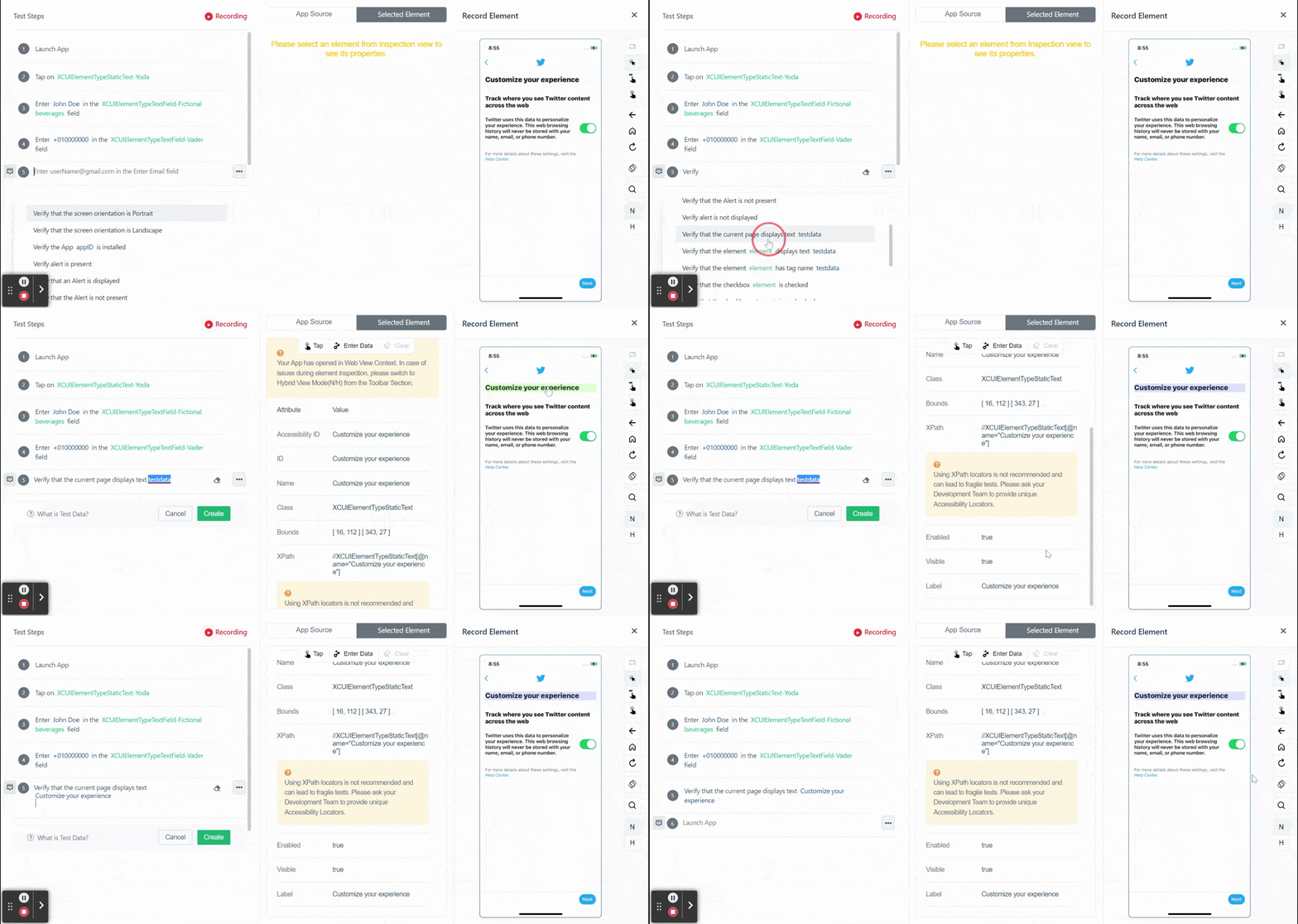
Now, let’s verify some text on the app screen.
219
218
@@ -225,7 +224,7 @@ You only need to replace the test data part with the actual text you copied, let
225
224
226
225
227
226
228
-
Paste this in place of “test data”. Click **Create** and you are done!
227
+
Paste this in place of **test data**. Click **Create** and you are done!
229
228
230
229
Here’s a summary of the steps we discussed so far.
@@ -241,17 +240,13 @@ To learn all other options available in the test recorder [click here](https://t
241
240
242
241
In this section you will learn:
243
242
244
-
1. How to add steps and create a new element on the go
243
+
1. How to add steps and create a new element on the go.<br>
245
244
Learn more about how to add steps manually from the test case details page [here](https://testsigma.com/docs/test-cases/create-steps-recorder/ios-apps/add-steps-manually/).
246
245
247
-

248
-
249
-
2. How to add steps using existing elements
246
+
2. How to add steps using existing elements.<br>
250
247
You can reuse them at any time by choosing the element you want to use/reuse in the Test Case. Simply pick the name of the Element.
251
248
252
-

253
-
254
-
3. How to add a simple verification steps
249
+
3. How to add a simple verification steps.<br>
255
250
Use the Verify action as used in Test Step 5 in the previous section.
256
251
257
252
4. Testsigma lets you capture all elements on the go.
@@ -261,15 +256,15 @@ In this section you will learn:
261
256
---
262
257
## [Run your test case](#run-your-test-case)
263
258
264
-
You can run your tests locally on your own machine or on the devices on the cloud (that you may not necessarily own!)
259
+
You can run your tests locally on your own machine or on the devices on the cloud (that you may not necessarily own!).
265
260
266
261
At the top right of your Test Steps page, click on **Run**.
267
262
268
263
Choose the device you wish to run your tests on, the device configurations, or how you’d like the screenshots captured, etc. You can choose these options based on your preference.
269
264
270
265
Click **Run Now**.
271
266
272
-
Here’s a video that shows you a sample test run done for the test case we created
267
+
Here’s a video that shows you a sample test run done for the test case we created.
Copy file name to clipboardExpand all lines: src/pages/tutorials/getting-started/automate-mobile-web-applications.md
+1-1Lines changed: 1 addition & 1 deletion
Display the source diff
Display the rich diff
Original file line number
Diff line number
Diff line change
@@ -1,6 +1,6 @@
1
1
---
2
2
title: "Testsigma Quick-Start Guide For mobile web Application Testing"
3
-
metadesc: ""
3
+
metadesc: "This Tutorial will help you learn the basics of creating tests with Testsigma and help you create and execute your first test case for a sample mobileweb application."
4
4
noindex: false
5
5
order: 1.2
6
6
page_id: "Testsigma Quick-Start Guide For mobile web Application Testing"
Copy file name to clipboardExpand all lines: src/pages/tutorials/getting-started/automate-rest-apis.md
+1-1Lines changed: 1 addition & 1 deletion
Display the source diff
Display the rich diff
Original file line number
Diff line number
Diff line change
@@ -1,6 +1,6 @@
1
1
---
2
2
title: "Get Started with REST API Testing"
3
-
metadesc: ""
3
+
metadesc: "This tutorial demonstrate how RESTful APIs or web services can be tested using Testsigma | Geting Started with REST API Testing in Testsigma"
0 commit comments