-
Notifications
You must be signed in to change notification settings - Fork 169
Expand file tree
/
Copy pathREADME.mdpp
More file actions
534 lines (382 loc) · 14.8 KB
/
Copy pathREADME.mdpp
File metadata and controls
534 lines (382 loc) · 14.8 KB
1
2
3
4
5
6
7
8
9
10
11
12
13
14
15
16
17
18
19
20
21
22
23
24
25
26
27
28
29
30
31
32
33
34
35
36
37
38
39
40
41
42
43
44
45
46
47
48
49
50
51
52
53
54
55
56
57
58
59
60
61
62
63
64
65
66
67
68
69
70
71
72
73
74
75
76
77
78
79
80
81
82
83
84
85
86
87
88
89
90
91
92
93
94
95
96
97
98
99
100
101
102
103
104
105
106
107
108
109
110
111
112
113
114
115
116
117
118
119
120
121
122
123
124
125
126
127
128
129
130
131
132
133
134
135
136
137
138
139
140
141
142
143
144
145
146
147
148
149
150
151
152
153
154
155
156
157
158
159
160
161
162
163
164
165
166
167
168
169
170
171
172
173
174
175
176
177
178
179
180
181
182
183
184
185
186
187
188
189
190
191
192
193
194
195
196
197
198
199
200
201
202
203
204
205
206
207
208
209
210
211
212
213
214
215
216
217
218
219
220
221
222
223
224
225
226
227
228
229
230
231
232
233
234
235
236
237
238
239
240
241
242
243
244
245
246
247
248
249
250
251
252
253
254
255
256
257
258
259
260
261
262
263
264
265
266
267
268
269
270
271
272
273
274
275
276
277
278
279
280
281
282
283
284
285
286
287
288
289
290
291
292
293
294
295
296
297
298
299
300
301
302
303
304
305
306
307
308
309
310
311
312
313
314
315
316
317
318
319
320
321
322
323
324
325
326
327
328
329
330
331
332
333
334
335
336
337
338
339
340
341
342
343
344
345
346
347
348
349
350
351
352
353
354
355
356
357
358
359
360
361
362
363
364
365
366
367
368
369
370
371
372
373
374
375
376
377
378
379
380
381
382
383
384
385
386
387
388
389
390
391
392
393
394
395
396
397
398
399
400
401
402
403
404
405
406
407
408
409
410
411
412
413
414
415
416
417
418
419
420
421
422
423
424
425
426
427
428
429
430
431
432
433
434
435
436
437
438
439
440
441
442
443
444
445
446
447
448
449
450
451
452
453
454
455
456
457
458
459
460
461
462
463
464
465
466
467
468
469
470
471
472
473
474
475
476
477
478
479
480
481
482
483
484
485
486
487
488
489
490
491
492
493
494
495
496
497
498
499
500
501
502
503
504
505
506
507
508
509
510
511
512
513
514
515
516
517
518
519
520
521
522
523
524
525
526
527
528
529
530
531
532
533
534
<p align="center">
<img alt="logo" src="document/image/144221063-a85b2cb0-0416-493f-9afb-56cff31e977d.jpg" width="300">
</p>
<h1 align="center" style="margin: 30px 0 30px; font-weight: bold;">PikaPython</h1>
<h4 align="center">Cross platform ultra lightweight embedded Python engine</h4>
<p align="center">
<a href="https://gitee.com/lyon1998/pikapython/stargazers"><img src="https://gitee.com/lyon1998/pikapython/badge/star.svg?theme=gvp"></a>
<a href="https://gitee.com/lyon1998/pikapython/members"><img src="https://gitee.com/lyon1998/pikapython/badge/fork.svg?theme=gvp"></a>
<a href="https://github.com/pikastech/pikapython/stargazers"><img src="https://img.shields.io/github/stars/pikastech/pikapython?style=flat-square&logo=GitHub"></a>
<a href="https://github.com/pikastech/pikapython/network/members"><img src="https://img.shields.io/github/forks/pikastech/pikapython?style=flat-square&logo=GitHub"></a>
<a href="https://github.com/pikastech/pikapython/watchers"><img src="https://img.shields.io/github/watchers/pikastech/pikapython?style=flat-square&logo=GitHub"></a>
<a href="https://github.com/pikastech/pikapython/issues"><img src="https://img.shields.io/github/issues/pikastech/pikapython.svg?style=flat-square&logo=GitHub"></a>
<a href="https://github.com/pikastech/pikapython/blob/master/LICENSE"><img src="https://img.shields.io/github/license/pikastech/pikapython.svg?style=flat-square"></a>
<a href="https://github.com/pikasTech/pikapython/actions/workflows/CI.yml"><img src="https://github.com/pikasTech/pikapython/actions/workflows/CI.yml/badge.svg"> </a>
<a href="https://app.codecov.io/gh/pikasTech/PikaPython"><img src="https://codecov.io/gh/pikasTech/PikaPython/branch/master/graph/badge.svg"> </a>
</p>
<p align="center">
<a href="README_zh.md" >中文页</a> |
<a href="https://whycan.com/f_55.html" >Forum</a> |
<a href="https://pikadoc-en.readthedocs.io/en/latest/index.html" >Documents</a> |
<a href="https://space.bilibili.com/5365336/channel/detail?cid=202329">Videos</a> |
<a href="../../tree/master/bsp#platform-support">BSP</a> |
<a href="https://pikadoc-en.readthedocs.io/en/latest/%E5%8C%85%E7%AE%A1%E7%90%86%E5%99%A8%E4%B8%8E%E6%A8%A1%E5%9D%97%E7%AE%A1%E7%90%86.html">Package Manager</a> |
<a href="https://pikadoc-en.readthedocs.io/en/latest/%E5%A6%82%E4%BD%95%E5%8F%82%E4%B8%8E%E7%A4%BE%E5%8C%BA%E8%B4%A1%E7%8C%AE.html" >Contribute</a> |
<a href="https://pikadoc-en.readthedocs.io/en/latest/%E5%95%86%E4%B8%9A%E5%90%88%E4%BD%9C%E6%96%B9%E5%BC%8F.html">Business</a>
</p>
[](https://pikastech.github.io/PikaPython/dev/bench/)
# 1. Abstract
PikaPython is an ultra-lightweight Python interpreter that runs with only 4KB of RAM, zero dependencies. It is ready to use out of the box without any configuration required and easy to extend with C.
PikaPython also known as PikaScript and PikaPy.
<img src="https://user-images.githubusercontent.com/88232613/147799704-d79345da-a2b9-4593-b1eb-ff9de127429a.png" width="500"/>
It's very easy to bind C function to python module with the help of Pika Pre-compiler.Only write the API of python in `.pyi` and the bindings are autoly generated by Pre-compiler.

# Get pikapython:
## Use Online Project Generator
Generator url:
http://pikascript.com
Note: You need the [Community Edition license (Now Free)](https://www.keil.com/pr/article/1299.htm) to build Keil projects, and the version of Keil should be newer than v5.36.
[](http://pikascript.com)
## PikaPython studio
PikaPython serial terminal, script download and package menage tool.
[](https://gitee.com/Lyon1998/pikapython/attach_files/1285327/download)
# Quick Start
You can use [simulation project](https://pikadoc-en.readthedocs.io/en/latest/Keil%20%E4%BB%BF%E7%9C%9F%E5%B7%A5%E7%A8%8B.html) to quick start without hardware,or use the out-of-the-box develop board [Pika-Pi—Zero](https://item.taobao.com/item.htm?spm=a1z10.3-c.w4002-23991764791.11.37216340XZtYt9&id=738387991209).
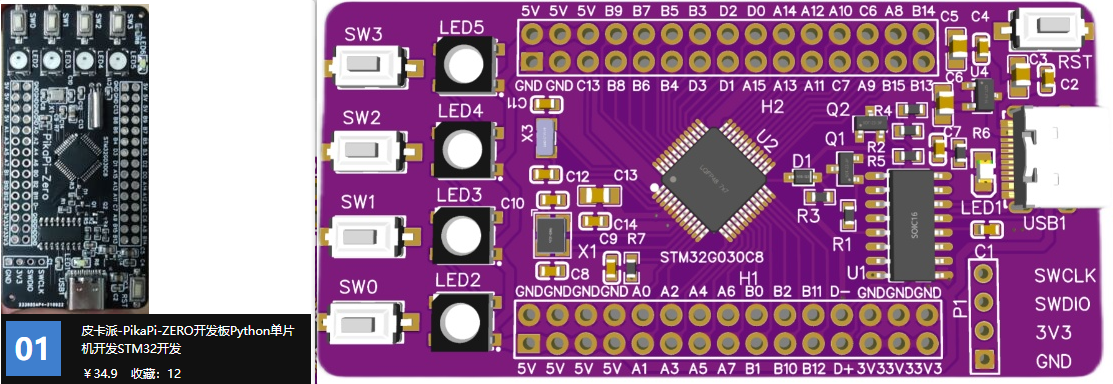
The board based on STM32G030C8T6 MCU, only 64kB Flash, 8kB RAM can run pikapython with total peripheral device (GPIO、TIME、IIC、RGB、KEY、LCD、RGB).
CH340 is deployed to support USB to serial with Type-C USB, support download python script py serial, there are 4 RGB on the board and support the [LCD](https://item.taobao.com/item.htm?spm=a1z10.3-c.w4002-23991764791.12.16f97c58fsLjVk&id=660745643102).
# Related Projects
- ▶️ [pikapython Binding For LVGL](https://github.com/lvgl/lv_binding_pikascript)
- ⭐ [pikapython Bluepill Demo In PlatformIO — Python-like REPL 🐍🔌](https://github.com/maxgerhardt/pikascript-pio-bluepill)
- ⭐ [pikapython Bluepill Demo In GCC 🐍](https://github.com/Chandler-Kluser/pikascript_gcc_bluepill)
- ⏩ [pika_startup_demo](https://gitee.com/kcfkwok/pika_startup_demo) This program demonstrate the 5 startup methods of pikapython.
- 🎮 [PikaPython-OpenHardware](https://gitee.com/Lyon1998/pikapython_openhardware) PikaPython 开源硬件
- 💻 [pikapython-msvc-qt](https://gitee.com/zuto360_460135301/pikapython-msvc-qt) 移植pikapython到windows平台,基于QT,采用MSVC编译器,移植pthread库,支持多线程。
# Document
https://pikadoc-en.readthedocs.io/en/latest/index.html
## How to contribute
https://pikadoc-en.readthedocs.io/en/latest/%E5%A6%82%E4%BD%95%E5%8F%82%E4%B8%8E%E7%A4%BE%E5%8C%BA%E8%B4%A1%E7%8C%AE.html
## Folders
[src](../../tree/master/src) - core code
[bsp](../../tree/master/bsp) - mcu/board support
[port](../../tree/master/port) - OS and package manager
[test](../../tree/master/port/linux/test) - unit test
[document](../../tree/master/document) - developt document
[examples](../../tree/master/examples) - example scripts
[package](../../tree/master/package) - packages and moudles
[pikaCompiler](../../tree/master/tools/pikaCompiler) - pre-compiler write by Rust, used to bind C function to python moudle.
[pikaPackageManager](../../tree/master/tools/pikaPackageManager) - pacakge manager
# 2.Platform support
## MCU support
!INCLUDE "bsp.mdpp"
## Board support
!INCLUDE "board.mdpp"
## OS support
!INCLUDE "os.mdpp"
# 3.Characteristic
### (1)Run environment
Support run in mcu without OS or file system. Can run in everywhere with **RAM ≥ 4kB** and **FLASH ≥ 64kB**,such as stm32g030, stm32f103c8t6,esp8266.
### (2)Develop enviroment
#### Support REPL by serial.
<img src="assets/1641178790145-2f026e70-4ba1-4e9a-b05f-c602b2bd8cad.png" width="400" alt="微信交流群"/><br/>
#### Support run and program python scripts by serial.
<img src="document/image/134841230-85de6734-8467-4245-93a5-d452b5022b42.gif" width="400" alt="微信交流群"/><br/>
Support IDEs like Keil, IAR, RT-Thread studio and segger embedded studio to develop C moudle.
Support build tools like CMake, makeFile and Scons.
Zero dependencies, zero configuration, out-of-the-box, easy to integrated into privious C projcet.
Eazy to extern customized C moudles.
Support linux.
### (3)Syntax
Support subaggregate of python 3 standard syntax.
Support class and method define, encapsulation-inheritance-polymorphism and moudles in `.pyi ` of C module.
<details><summary>More Details About Syntax Support</summary>
|Syntax|Compile-Time|Run-Time|Shell|
|---|---|---|---|
|Module Define |√|-|-|
|Module Import |√|√|√|
|Class Define |√|√|√|
|Class Inherit |√|√|√|
|Method Define |√|√|√|
|Method Override |√|√|√|
|Method Invoke |√|√|√|
|Argument Define |√|√|√|
|Argument Assignment |√|√|√|
|Object New |√|√|√|
|Object Free |√|√|√|
|Object Nest |√|√|√|
|Control flow |√|√|√|
!INCLUDE "syntax.mdpp"
</details>
### (4)Develop standard.
Readability first, nearly never use macro function and global argument.
Complete unit testes based on google test.
# 4.Both talk and show the code:
## E-mail: liang6516@outlook.com
# 5.Demo
The scripts in demos are in the [examples](examples) folder.
## Demo 01 GPIO
<details><summary>View Code</summary>
``` python
import PikaStdLib
import STM32G0
mem = PikaStdLib.MemChecker()
io1 = STM32G0.GPIO()
time = STM32G0.Time()
io1.setPin('PA8')
io1.setMode('out')
io1.enable()
io1.low()
print('hello pikapython')
print('mem.max :')
mem.max()
print('mem.now :')
mem.now()
while True:
io1.low()
time.sleep_ms(500)
io1.high()
time.sleep_ms(500)
```
</details>

## Demo 02 USART
<details><summary>View Code</summary>
``` python
import PikaStdLib
import STM32G0
time = STM32G0.Time()
uart = STM32G0.UART()
uart.setId(1)
uart.setBaudRate(115200)
uart.enable()
while True:
time.sleep_ms(500)
readBuff = uart.read(2)
print('read 2 char:')
print(readBuff)
```
</details>

## Demo 03 ADC
<details>
<summary>View Code</summary>
``` python
import PikaStdLib
import STM32G0
time = STM32G0.Time()
adc1 = STM32G0.ADC()
adc1.setPin('PA1')
adc1.enable()
while True:
val = adc1.read()
print('adc1 value:')
print(val)
time.sleep_ms(500)
```
</details>

## Demo 04 PWM output
<details><summary>View Code</summary>
``` python
import PikaStdLib
import STM32G0
time = STM32G0.Time()
pwm = STM32G0.PWM()
pwm.setPin('PA8')
pwm.setFrequency(2000)
pwm.setDuty(0.5)
pwm.enable()
while True:
time.sleep_ms(500)
pwm.setDuty(0.5)
time.sleep_ms(500)
pwm.setDuty(0.001)
```
</details>
## Demo 05 RGB
<details><summary>View Code</summary>
``` python
import STM32G0
import PikaPiZero
import PikaStdLib
rgb = PikaPiZero.RGB()
mem = PikaStdLib.MemChecker()
rgb.init()
rgb.enable()
print('hello 2')
print('mem used max:')
mem.max()
while True:
print('flowing')
rgb.flow()
```
</details>
## Demo 06 Snake(Need LCD)
<details>
<summary>View Code</summary>
``` python
from PikaObj import *
import PikaStdLib
import PikaPiZero
import STM32G0
# hardware init
lcd = PikaPiZero.LCD()
lcd.init()
lcd.clear('white')
key = PikaPiZero.KEY()
key.init()
time = STM32G0.Time()
x_max = 120
y_max = 150
# snake init
s = PikaPiZero.Point()
w = 9
h = 9
s.x = 50
s.y = 10
len = 0
while len < 3:
b = s
i = 0
while i < len:
b = b.next
i = i + 1
b.next = PikaPiZero.Point()
b.next.x = b.x - 10
b.next.y = b.y
b.next.prev = b
len = len + 1
# ring link
b.next = s
s.prev = b
i = 0
b = s
while i < len:
lcd.fill(b.x, b.y, w, h, 'blue')
b = b.next
i = i + 1
print('snake lengh')
print(len)
# fruit init
f = PikaPiZero.Point()
f.x = 30
f.y = 20
lcd.fill(f.x, f.y, w, h, 'green')
# memory check
mem = PikaStdLib.MemChecker()
print('mem used max:')
mem.max()
# main loop
d = 0
isUpdate = 1
isEat = 0
while True:
if isUpdate:
# isUpdate = 0
# check eat fruit
if f.x == s.x and f.y == s.y:
# have eat fruit
isEat = 1
f.x = f.x + 30
if f.x > x_max:
f.x = f.x - x_max
f.y = f.y + 30
if f.y > y_max:
f.y = f.y - y_max
lcd.fill(f.x, f.y, w, h, 'green')
# move snake by the direction
if d == 0:
x_new = s.x + 10
y_new = s.y
if x_new > x_max:
x_new = 0
elif d == 1:
x_new = s.x
y_new = s.y - 10
if y_new < 0:
y_new = y_max
elif d == 2:
x_new = s.x
y_new = s.y + 10
if y_new > y_max:
y_new = 0
elif d == 3:
x_new = s.x - 10
y_new = s.y
if x_new < 0:
x_new = x_max
if isEat:
isEat = 0
b_new = PikaPiZero.Point()
b_new.x = x_new
b_new.y = y_new
b_new.prev = s.prev
b_new.next = s
s.prev.next = b_new
s.prev = b_new
s = b_new
len = len + 1
print('snake lengh')
print(len)
print('mem used max:')
mem.max()
# drow the snake and fruit
# clear last body
lcd.fill(s.prev.x, s.prev.y, w, h, 'white')
# new body
s.prev.x = x_new
s.prev.y = y_new
# head is last body
s = s.prev
lcd.fill(s.x, s.y, w, h, 'blue')
b = s
i = 0
# scan key
key_val = key.get()
if key_val == 0:
d = 0
isUpdate = 1
elif key_val == 1:
d = 1
isUpdate = 1
elif key_val == 2:
d = 2
isUpdate = 1
elif key_val == 3:
d = 3
isUpdate = 1
```
</details>

The maximum RAM usage of these demos is only 3.56K, which is 4.56K if the 1K stack is included, and the maximum Flash usage is 30.4K. Refer to the 20K RAM and 64K Flash of STM32F103C8T6, less than 25% RAM and less than 50% Flash are used.
## About the custom extern module ?
In addition to device drivers, developing custom Python modules for MCU is very easy. The following two demos are extensions of the custom module, which developed python interfaces for the ARM-2D image driver library.
## Boxes~

## Rotating suns~

# 6.Test and develop Core
## Test core in docker (recommend)
[get start with docker](https://pikadoc-en.readthedocs.io/en/latest/get-start_linux.html)
# ✨ Contributors
<a href="https://github.com/pikastech/pikapython/graphs/contributors">
<img src="https://contrib.rocks/image?repo=pikastech/pikascript" />
</a>
## [How to contribute](https://pikadoc-en.readthedocs.io/en/latest/%E5%A6%82%E4%BD%95%E5%8F%82%E4%B8%8E%E7%A4%BE%E5%8C%BA%E8%B4%A1%E7%8C%AE.html)
<div class="log"></div>
### Contribute Log On 2023
| Contribute log | Contributer |
| --- | --- |
!INCLUDE "contributor2023.mdpp"
<details><summary> Contribute Log On 2022 </summary>
| Contribute log | Contributer |
| --- | --- |
!INCLUDE "contributor2022.mdpp"
</details>
<details><summary> Contribute Log On 2021 </summary>
| Contribute log | Contributer |
| --- | --- |
!INCLUDE "contributor2021.mdpp"
</details>
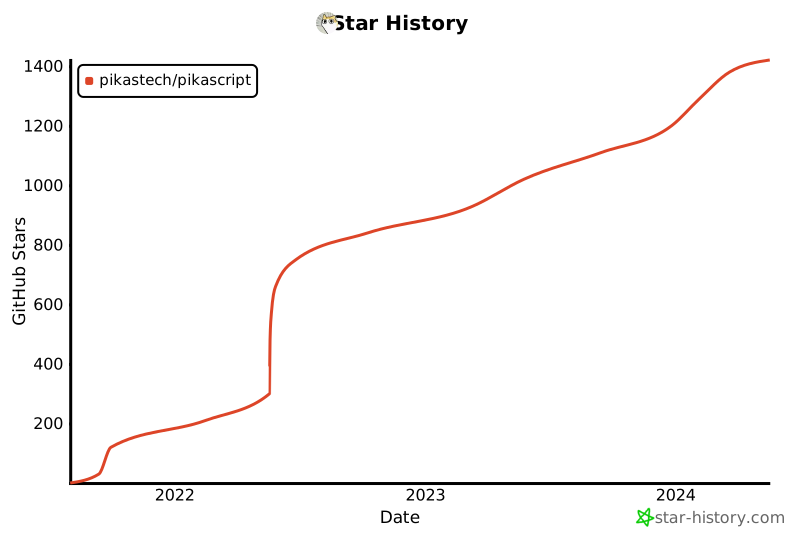
## Star History
[](https://star-history.com/#pikastech/pikascript&Date)