|
| 1 | +# springBoot3.2 + jdk21 + GraalVM上手体验 |
| 2 | + |
| 3 | +>参考官方文章进行体验:https://spring.io/blog/2023/09/09/all-together-now-spring-boot-3-2-graalvm-native-images-java-21-and-virtual |
| 4 | +> |
| 5 | +>可以通过官方快速得到一个基于jdk21的项目:https://start.spring.io/ |
| 6 | +
|
| 7 | +## 快速体验(二进制部署) |
| 8 | + |
| 9 | +```java |
| 10 | +@RestController |
| 11 | +@SpringBootApplication |
| 12 | +public class DemoApplication { |
| 13 | + |
| 14 | + public static void main(String[] args) { |
| 15 | + SpringApplication.run(DemoApplication.class, args); |
| 16 | + } |
| 17 | + |
| 18 | + @GetMapping("/customers") |
| 19 | + Collection<Customer> customers() { |
| 20 | + return Set.of(new Customer(1, "A"), new Customer(2, "B"), new Customer(3, "C")); |
| 21 | + } |
| 22 | + |
| 23 | + record Customer(Integer id, String name) { |
| 24 | + } |
| 25 | +} |
| 26 | +``` |
| 27 | + |
| 28 | +启动非常快,秒启动 |
| 29 | + |
| 30 | +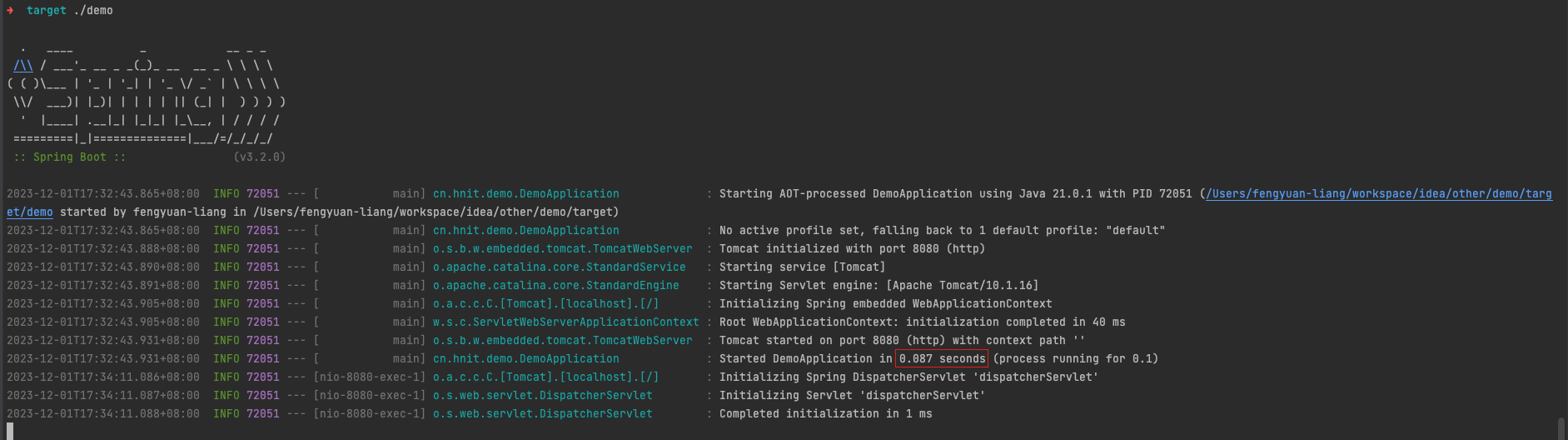 |
| 31 | + |
| 32 | +压测环境内存占用大概70MB左右,空闲时在20MB左右(由于直接打成二进制文件了,不能再使用jconsole、arthas之类的进行监控了),性能上由于不需要JVM预热,性能启动即巅峰。 |
| 33 | + |
| 34 | +```shell |
| 35 | +$ ab -c 50 -n 10000 http://localhost:8080/customers |
| 36 | +Server Software: |
| 37 | +Server Hostname: localhost |
| 38 | +Server Port: 8080 |
| 39 | + |
| 40 | +Document Path: /customers |
| 41 | +Document Length: 61 bytes |
| 42 | + |
| 43 | +Concurrency Level: 50 |
| 44 | +Time taken for tests: 1.413 seconds |
| 45 | +Complete requests: 10000 |
| 46 | +Failed requests: 0 |
| 47 | +Total transferred: 1660000 bytes |
| 48 | +HTML transferred: 610000 bytes |
| 49 | +Requests per second: 7076.39 [#/sec] (mean) |
| 50 | +Time per request: 7.066 [ms] (mean) |
| 51 | +Time per request: 0.141 [ms] (mean, across all concurrent requests) |
| 52 | +Transfer rate: 1147.15 [Kbytes/sec] received |
| 53 | + |
| 54 | +Connection Times (ms) |
| 55 | + min mean[+/-sd] median max |
| 56 | +Connect: 0 2 8.0 2 144 |
| 57 | +Processing: 1 5 6.7 4 147 |
| 58 | +Waiting: 0 4 5.6 3 145 |
| 59 | +Total: 1 7 10.4 6 149 |
| 60 | +``` |
| 61 | +
|
| 62 | + |
| 63 | +
|
| 64 | +## 快速体验(jar部署) |
| 65 | +
|
| 66 | +jar包占用只有19MB,已经不能算是小胖jar了😊 |
| 67 | +
|
| 68 | +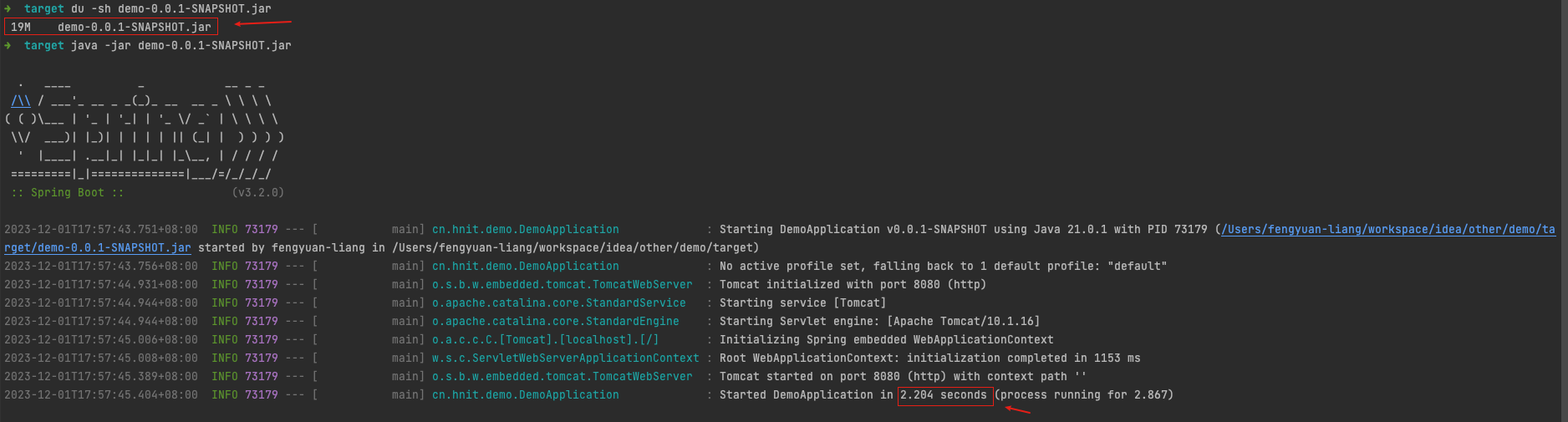 |
| 69 | +
|
| 70 | +内存占用在压测时大概在200MB左右,空闲时在160MB左右。性能显然也不是启动即巅峰,可以看出其实还是需要进行JVM预热才能达到性能巅峰的 |
| 71 | +
|
| 72 | +```shell |
| 73 | +$ ab -c 50 -n 10000 http://localhost:8080/customers |
| 74 | +Server Software: |
| 75 | +Server Hostname: localhost |
| 76 | +Server Port: 8080 |
| 77 | + |
| 78 | +Document Path: /customers |
| 79 | +Document Length: 61 bytes |
| 80 | + |
| 81 | +Concurrency Level: 50 |
| 82 | +Time taken for tests: 17.930 seconds |
| 83 | +Complete requests: 10000 |
| 84 | +Failed requests: 0 |
| 85 | +Total transferred: 1660000 bytes |
| 86 | +HTML transferred: 610000 bytes |
| 87 | +Requests per second: 557.72 [#/sec] (mean) |
| 88 | +Time per request: 89.651 [ms] (mean) |
| 89 | +Time per request: 1.793 [ms] (mean, across all concurrent requests) |
| 90 | +Transfer rate: 90.41 [Kbytes/sec] received |
| 91 | + |
| 92 | +Connection Times (ms) |
| 93 | + min mean[+/-sd] median max |
| 94 | +Connect: 0 38 430.2 2 7004 |
| 95 | +Processing: 0 14 90.4 8 1773 |
| 96 | +Waiting: 0 12 88.7 6 1771 |
| 97 | +Total: 1 53 439.0 10 7011 |
| 98 | +``` |
| 99 | +
|
| 100 | + |
| 101 | +
|
| 102 | +
|
| 103 | +
|
| 104 | +## 对比golang |
| 105 | +
|
| 106 | +```go |
| 107 | +package main |
| 108 | + |
| 109 | +import ( |
| 110 | + "encoding/json" |
| 111 | + "flag" |
| 112 | + "fmt" |
| 113 | + "net/http" |
| 114 | +) |
| 115 | + |
| 116 | +var port = flag.String("p", "8080", "please input port") |
| 117 | + |
| 118 | +func main() { |
| 119 | + http.HandleFunc("/customers", func(writer http.ResponseWriter, request *http.Request) { |
| 120 | + data, _ := json.Marshal(request.URL) |
| 121 | + writer.Write(data) |
| 122 | + }) |
| 123 | + e := make(chan error) |
| 124 | + go func() { |
| 125 | + e <- fmt.Errorf("error[%v]", http.ListenAndServe(":"+*port, nil)) |
| 126 | + }() |
| 127 | + fmt.Println("http 服务器启动...") |
| 128 | + fmt.Println(<-e) |
| 129 | +} |
| 130 | +``` |
| 131 | +
|
| 132 | +这里golang没有使用框架,仅使用标准库,所以内存占用较低,仅10MB左右,即使使用Gin之类的web框架,内存也不会超过20MB |
| 133 | +
|
| 134 | +```shell |
| 135 | +$ ab -c 50 -n 10000 http://localhost:8080/customers |
| 136 | +Server Software: |
| 137 | +Server Hostname: localhost |
| 138 | +Server Port: 8080 |
| 139 | + |
| 140 | +Document Path: /customers |
| 141 | +Document Length: 161 bytes |
| 142 | + |
| 143 | +Concurrency Level: 50 |
| 144 | +Time taken for tests: 1.380 seconds |
| 145 | +Complete requests: 10000 |
| 146 | +Failed requests: 0 |
| 147 | +Total transferred: 2790000 bytes |
| 148 | +HTML transferred: 1610000 bytes |
| 149 | +Requests per second: 7247.68 [#/sec] (mean) |
| 150 | +Time per request: 6.899 [ms] (mean) |
| 151 | +Time per request: 0.138 [ms] (mean, across all concurrent requests) |
| 152 | +Transfer rate: 1974.71 [Kbytes/sec] received |
| 153 | + |
| 154 | +Connection Times (ms) |
| 155 | + min mean[+/-sd] median max |
| 156 | +Connect: 0 2 16.5 2 459 |
| 157 | +Processing: 0 4 27.9 2 460 |
| 158 | +Waiting: 0 2 10.5 2 459 |
| 159 | +Total: 1 7 32.3 4 462 |
| 160 | +``` |
| 161 | +
|
| 162 | + |
| 163 | +
|
| 164 | +## 结论 |
| 165 | +
|
| 166 | +AOT-processed已经相对成熟,效果可以说非常惊艳,解决了`JVM`启动慢、需要预热、内存占用大的问题。 |
| 167 | +
|
| 168 | +美中不足的是编译速度非常慢,笔者电脑2017款mac book pro编译花费大概15分钟左右 |
| 169 | +
|
| 170 | +```shell |
| 171 | +Finished generating 'demo' in 14m 33s. |
| 172 | +[INFO] ------------------------------------------------------------------------ |
| 173 | +[INFO] BUILD SUCCESS |
| 174 | +[INFO] ------------------------------------------------------------------------ |
| 175 | +[INFO] Total time: 15:45 min |
| 176 | +[INFO] Finished at: 2023-12-01T17:00:21+08:00 |
| 177 | +[INFO] ------------------------------------------------------------------------ |
| 178 | +``` |
| 179 | +
|
| 180 | +可以看出java在云原生大环境下已经取得了不错的进步的 |
0 commit comments