@@ -26,10 +26,11 @@ Intent callIntent = new Intent(Intent.ACTION_DIAL, number);
2626
2727当使用` startActivity() ` 方法执行该` Intent ` 时,拨号应用就会拨打指定号码。
2828
29- 下面是几个其他的` intent ` 和他们的` action ` 以及` Uri ` 类型的数据:
29+ 下面是几个其他的` intent ` 和他们的` action ` 以及` Uri ` 类型的数据:
30+
3031- 查看地图:
3132 ``` java
32- // Map point based on address
33+ // Map point based on address
3334 Uri location = Uri . parse(" geo:0,0?q=1600+Amphitheatre+Parkway,+Mountain+View,+California"
3435 // Or map point based on latitude/longitude
3536 // Uri location = Uri.parse("geo:37.422219,-122.08364?z=14"); // z param is zoom level
@@ -45,6 +46,7 @@ Intent callIntent = new Intent(Intent.ACTION_DIAL, number);
4546默认情况下系统会根据`Uri `数据类型来决定需要哪些合适的`MIME `类型。如果你没有在`intent`中包含`Uri `, 则通常需要使用`setType()`方法来指定`intent`所需要附带的数据类型。设置`MIME `类型 是为了指定哪些`activity`可以接受这个intent。
4647
4748下面是几个通过`extra`数据来指定`action`的`intent`:
49+
4850- 发送带有附件的邮件:
4951 ```java
5052 Intent emailIntent = new Intent (Intent . ACTION_SEND
@@ -72,7 +74,7 @@ Intent callIntent = new Intent(Intent.ACTION_DIAL, number);
7274
7375###检验是否有应用可以接受该Intent
7476
75- 虽然`Android`平台保证每一个确定的`Intent`都可以被内置应用所接受(例如电话、邮件、日历程序),但是在开启一个`intent`之前仍然需要去检验一下。
77+ 虽然`Android`平台保证每一个确定的`Intent`都可以被内置应用所接受(例如电话、邮件、日历程序),但是在开启一个`intent`之前仍然需要去检验一下。
7678< **注意:**如果开启一个没有应用可以处理的`intent`时,应用就会崩溃。
7779
7880想要验证是否有`Activity`可以相应相应的`intent`时可以调用`queryIntentActivities()`方法来获取可以处理该`intent`的`activity`集合。如果返回的集合不为空,你就可以放心的使用该`intent`,例如:
@@ -89,7 +91,7 @@ boolean isIntentSafe = activities.size() > 0;
8991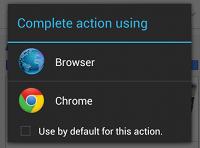
9092```java
9193startActivity(intent);
92- ````
94+ ```
9395
9496下面是一个完整的创建一个显示地图的`intent`并且去验证是否有应用可以处理当前`intent`的示例:
9597```java
@@ -180,6 +182,150 @@ protected void onActivityResult(int requestCode, int resultCode, Intent data) {
180182
181183在这个例子中,`Android`系统的联系人或者联系人应用返回的`Intent`数据提供了一个`Uri`来识别用户选择的联系人。
182184
185+ 为了能正确的处理结果数据,你必须要直到返回结果`Intent`的格式。如果返回加过的`Activity`是自己应用中的,那么做到这一点会比较简单。`Android`系统提供了中的应用会提供它们自己的`API`来处理相应的结果数据。例如联系人程序通常会在结果中返回指定联系人的`URI`,照相机应用会在`extra`中的数据中返回`Bitmap`对象。
186+
187+ ####扩展:读取联系人数据
188+
189+ 上面的代码中只展示了获取联系人数据返回的结果,但是没有读取返回结果中的数据,因为这会牵扯到`content providers`中的内容。当然如果你在这里非常想知道的话,下面的代码就显示了如何能从联系人数据中获取到相应的电话号码:
190+ ```java
191+ @Override
192+ protected void onActivityResult(int requestCode, int resultCode, Intent data) {
193+ // Check which request it is that we're responding to
194+ if (requestCode == PICK_CONTACT_REQUEST) {
195+ // Make sure the request was successful
196+ if (resultCode == RESULT_OK) {
197+ // Get the URI that points to the selected contact
198+ Uri contactUri = data.getData();
199+ // We only need the NUMBER column, because there will be only one row in the result
200+ String[] projection = {Phone.NUMBER};
201+
202+ // Perform the query on the contact to get the NUMBER column
203+ // We don't need a selection or sort order (there's only one result for the given URI)
204+ // CAUTION: The query() method should be called from a separate thread to avoid blocking
205+ // your app's UI thread. (For simplicity of the sample, this code doesn't do that.)
206+ // Consider using CursorLoader to perform the query.
207+ Cursor cursor = getContentResolver()
208+ .query(contactUri, projection, null, null, null);
209+ cursor.moveToFirst();
210+
211+ // Retrieve the phone number from the NUMBER column
212+ int column = cursor.getColumnIndex(Phone.NUMBER);
213+ String number = cursor.getString(column);
214+
215+ // Do something with the phone number...
216+ }
217+ }
218+ }
219+ ```
220+
221+ < **Note:**在`Android`2.3(`API`9)之前版本中,执行`Contacts Provider`中的查询需要声明`READ_CONTACTS`权限。然而从`Android`2.3版本开始,联系人应用在返回结果时可以提供一个临时的权限用于读取`Contacts Provider`中的数据。但是这种权限是临时的并且只会由于特定的请求,所以并不能获取到除返回的`intent`以外的联系人信息,除非声明`READ_CONTACTS`权限。
222+
223+ 允许其它应用开启你的Activity
224+ ---
225+
226+ 上面都是说了在自己应用中开启其他应用`activity`的部分。但是如果你的应用可以执行一些其他应用需要使用的功能时,你的应用就应该需要相应对应的请求给其它应用。例如,如果你有一个可以分享信息和图片给朋友的应用,那你最好要支持`ACTION_SEND`这个`intent`以便其他应用在执行分享操作时可以开启你的应用。
227+
228+ 为了能让其他应用开启你的`activity`,你需要在`manifest`文件中对应的`<activity>`标签下添加`<intent-filter>`标签。
229+
230+ 当你的应用被安装到手机上时,系统会识别你的`intent-filter`属性并把其添加到系统中一个内置的支持所有已安装应用的配置文件中。当应用使用隐式意图调用`startActivity()`或`startActivityForResult()`方法时,系统就会去寻找可以相应该`intent`的`activity`。
231+ ###添加Intent Filter
232+
233+ 为了能明确的指定`activity`可以处理的`intent`,每个添加的`intent filter`都需要尽可能详细的指定`activity`可以接受的动作类型和数据。
234+
235+ 如果`activity`中有`intent-filter`可以满足下面的`Intent`属性,系统就能把特定的`intent`发送给你的`activity`:
236+
237+ - Action
238+ 所要执行动作的名字。通常是已经定义的值例如`ACTION_SEND`或`ACTION_VIEW`等。在`intent filter`中的`<action>`标签指定该值。
239+
240+ - Data
241+ `intent`附加数据的描述。在`intent filter`中的`<data>`标签中进行指定。可以指定一个或多个属性,你可以只指定`MIME`类型,`URI`前缀,`URI scheme`或者结合他们几个来使用。
242+ < **Note:**如果不需要处理`Uri`数据(就像你的`activity`不会处理`URI`而是处理其他`extra`数据时),你可以只指定`android:mimeType`属性来指定`activity`可以处理的数据类型,例如`text/plain`或`image/jpeg`。
243+ - Category
244+ 提供一个附加的方法来标识该`activity`可以处理的`intent`。通常与用户的手势或者是启动位置有关。系统支持几种不同的`categories`,但是大多数都用的不多。所有的隐式意图默认都是`CATEGORY_DEFAULT` 类型的。可以在`intent filter`中的`<category>`标签来指定它的值。
245+
246+ 例如,下面就是一个`activity`中的`intent filter`属性,它可以处理数据类型是文字或者图片时的`ACTION_SEND`意图。
247+ ```java
248+ <activity android:name="ShareActivity">
249+ <intent-filter>
250+ <action android:name="android.intent.action.SEND"/>
251+ <category android:name="android.intent.category.DEFAULT"/>
252+ <data android:mimeType="text/plain"/>
253+ <data android:mimeType="image/*"/>
254+ </intent-filter>
255+ </activity>
256+ ```
257+
258+ 每个`intent`只能指定一个`action`和一中`data type`,但是在`<intent-filter>`中可以指定多个`<action>`,`<category>`和<data>`标签。
259+
260+ 如果任何的两对`action`与`data`是互相矛盾的,你应该创建不同的`intent filter`来指定特定的`action`与`type`。
261+
262+ 例如,假设你的`activity`可以处理`ACTION_SEND`和`ACTION_SENDTO`这两种行为下的文本和图片。在这种情况下就必须要对这两个行为分开定义到另个`intent filters`中,因为`ACTION_SENDTO`必须要使用`Uri`数据来指定使用`send`或`sendto`所发送到的地址。
263+ ```java
264+ <activity android:name="ShareActivity">
265+ <!-- filter for sending text; accepts SENDTO action with sms URI schemes -->
266+ <intent-filter>
267+ <action android:name="android.intent.action.SENDTO"/>
268+ <category android:name="android.intent.category.DEFAULT"/>
269+ <data android:scheme="sms" />
270+ <data android:scheme="smsto" />
271+ </intent-filter>
272+ <!-- filter for sending text or images; accepts SEND action and text or image data -->
273+ <intent-filter>
274+ <action android:name="android.intent.action.SEND"/>
275+ <category android:name="android.intent.category.DEFAULT"/>
276+ <data android:mimeType="image/*"/>
277+ <data android:mimeType="text/plain"/>
278+ </intent-filter>
279+ </activity>
280+ ```
281+ < **Note:**为了能够接受到隐式意图,必须要在`intent filter`中包含值为`CATEGORY_DEFAULT`的`category`。`startActivity()`和`startActivityForResult()`方法会将系统中的所有`intent`对待成在`category`中声明了`CATEGORY_DEFAULT`值。如果在`intent filter`中没有声明它,那么你的`activity`将无法相应隐式意图。
282+
283+
284+ ###在Activity中处理Intent
285+
286+ 为了能知道`activity`中所支持的`action`,可以通过读取开启该`activity`的`intent`来得知。
287+
288+ 开启`activity`后,可以通过`getIntent()`方法来获取开启该`activity`的`Intent`对象。可以在`activity`生命周期中的任何一个方法中来这样进行操作,但一般应该在声明周期的一些早前回调中例如`onCreate()`或者`onStart()`方法中去进行操作。
289+ 例如:
290+ ```java
291+ @Override
292+ protected void onCreate(Bundle savedInstanceState) {
293+ super.onCreate(savedInstanceState);
294+
295+ setContentView(R.layout.main);
296+
297+ // Get the intent that started this activity
298+ Intent intent = getIntent();
299+ Uri data = intent.getData();
300+
301+ // Figure out what to do based on the intent type
302+ if (intent.getType().indexOf("image/") != -1) {
303+ // Handle intents with image data ...
304+ } else if (intent.getType().equals("text/plain")) {
305+ // Handle intents with text ...
306+ }
307+ }
308+ ```
309+
310+ ###返回结果
311+
312+ 如果想要返回一个结果给启动你的`Activity`时,可以调用`setResult()`方法并指定结果值和结果的`intent`。当用户做完相应的操作并且需要返回到之前的`activity`时,可以调用`finish()`方法来关闭你的`activity`。例如:
313+ ```java
314+ // Create intent to deliver some kind of result data
315+ Intent result = new Intent("com.example.RESULT_ACTION", Uri.parse("content://result_uri");
316+ setResult(Activity.RESULT_OK, result);
317+ finish();
318+ ```
319+ 你必须要指定一个返回结果的结果值。通常可以是`RESULT_OK`或者`RESULT_CANCELED`。必要的时候你也可以通过`Intent`提供一些附加的数据。
320+ < **Note:**默认情况下结果值是`RESULT_CANCELED`。所以如果用户在你还没有完成相应操作时也就是在你设置结果之前按了返回键时,之前的`activity`就是收到`canceled`的结果。
321+
322+ 如果需要返回一个几个特定结果选中的某一个时,你可以指定结果值为任何一个大于0的数。如果需要传递一个结果值,但是又不需要返回`intent`结果时,你可以调用`setResult()`方法来传递一个结果值。例如:
323+ ```java
324+ setResult(RESULT_COLOR_RED);
325+ finish();
326+ ```
327+
328+ < **Note:**没有必要去检查你的`activity`是被`startActivity()`还是`startActivityForResult()`所开启。如果开启你的`activity`需要结果时就调用`setResult()`方法。如果使用`startActivityForResult()`方法调用时系统会传递`setResult()`方法中的内容给它,否则,就会忽略这个结果。
183329
184330
185331
0 commit comments