


Microsoft Graph JavaScript 客户端库轻型 Microsoft Graph API 包装器,可在服务器侧和浏览器中使用。
正常查找模型上的 IntelliSense(用户、组等)?查看 Microsoft Graph 类型存储库!
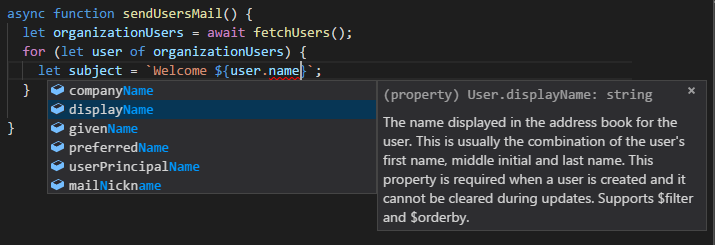
npm install @microsoft/microsoft-graph-client导入 @microsoft/microsoft-graph-client 至你的模块,同时需要填充代码如isomorphic-fetch等来进行提取。
import "isomorphic-fetch";
import { Client } from "@microsoft/microsoft-graph-client";包含 graph-js-sdk.js 至 HTML 页面。
<script type="text/javascript" src="https://cdn.jsdelivr.net/npm/@microsoft/microsoft-graph-client/lib/graph-js-sdk.js"></script>如果你的浏览器不支持“提取 [支持] 或承诺 [支持],需要使用类似 github/fetch 的填充代码进行提取,并使用 es6-promise 等进行承诺。
<!-- polyfilling promise -->
<script type="text/javascript" src="https://cdn.jsdelivr.net/npm/es6-promise/dist/es6-promise.auto.min.js"></script>

<!-- polyfilling fetch -->
<script type="text/javascript" src="https://cdn.jsdelivr.net/npm/whatwg-fetch/dist/fetch.umd.min.js"></script>

<!-- depending on your browser you might wanna include babel polyfill -->
<script type="text/javascript" src="https://cdn.jsdelivr.net/npm/@babel/polyfill@7.4.4/dist/polyfill.min.js"></script>使用下列支持的身份验证门户之一注册应用程序,以使用 Microsoft Graph API:
- 转到 Microsoft 应用程序注册门户:使用统一的 V2 验证终结点来注册使用 Microsoft 账户和/或组织账户工作的新应用程序。
- Microsoft Azure Active Directory:在租户 Active Directory 中注册新应用程序,以支持租户或多租户的工作或学校账户。
对于负责获取 accessToken 的 MSAL(Microsoft 身份验证库),Microsoft Graph JavaScript 客户端库拥有适配器实现(ImplicitMSALAuthenticationProvider)。MSAL 库不随此库提供,用户需要外部将之包含(对于包含 MSAL,参见“此处”)。
**重要说明:**MSAL 仅支持前端应用程序,对于服务器侧身份应用,需要实现自己的 AuthenticationProvider。了解如何创建“自定义身份验证提供程序”。
有关兼容 msal 版本和下列版本的更新,参见package.json 中的 devDependencies。
<script src="https://secure.aadcdn.microsoftonline-p.com/lib/<version>/js/msal.min.js"></script>// Configuration options for MSAL @see https://github.com/AzureAD/microsoft-authentication-library-for-js/wiki/MSAL.js-1.0.0-api-release#configuration-options
const msalConfig = {
auth: {
clientId: "your_client_id", // Client Id of the registered application
redirectUri: "your_redirect_uri",
},
};
const graphScopes = ["user.read", "mail.send"]; // An array of graph scopes
// Important Note: This library implements loginPopup and acquireTokenPopup flow, remember this while initializing the msal
// Initialize the MSAL @see https://github.com/AzureAD/microsoft-authentication-library-for-js#1-instantiate-the-useragentapplication
const msalApplication = new Msal.UserAgentApplication(msalConfig);
const options = new MicrosoftGraph.MSALAuthenticationProviderOptions(graphScopes);
const authProvider = new MicrosoftGraph.ImplicitMSALAuthenticationProvider(msalApplication, options);有关兼容 msal 版本和下列版本的更新,参见package.json 中的 devDependencies。
npm install msal@<version>import { UserAgentApplication } from "msal";
import { ImplicitMSALAuthenticationProvider } from "./node_modules/@microsoft/microsoft-graph-client/lib/src/ImplicitMSALAuthenticationProvider";
// An Optional options for initializing the MSAL @see https://github.com/AzureAD/microsoft-authentication-library-for-js/wiki/MSAL-basics#configuration-options
const msalConfig = {
auth: {
clientId: "your_client_id", // Client Id of the registered application
redirectUri: "your_redirect_uri",
},
};
const graphScopes = ["user.read", "mail.send"]; // An array of graph scopes
// Important Note: This library implements loginPopup and acquireTokenPopup flow, remember this while initializing the msal
// Initialize the MSAL @see https://github.com/AzureAD/microsoft-authentication-library-for-js#1-instantiate-the-useragentapplication
const msalApplication = new UserAgentApplication(msalConfig);
const options = new MicrosoftGraph.MSALAuthenticationProviderOptions(graphScopes);
const authProvider = new ImplicitMSALAuthenticationProvider(msalApplication, options);通过实现 IAuthenticationProvider 接口,用户可集成自己首选的身份验证库。参见实现“身份验证提供程序”。
“客户端”类实例处理 Microsoft Graph API 请求并处理响应。若要创建此类的新实例,需要提供 IAuthenticationProvider 实例,它需要作为 ClientOptions 中的 authProvider 密钥值传递至静态初始化表达式方法 Client.initWithMiddleware。
const options = {
	authProvider, // An instance created from previous step
};
const Client = MicrosoftGraph.Client;
const client = Client.initWithMiddleware(options);import { Client } from "@microsoft/microsoft-graph-client";
const options = {
authProvider, // An instance created from previous step
};
const client = Client.initWithMiddleware(options);有关初始化客户端的详细信息,请参阅“此文档”。
拥有身份验证设置和客户端实例后,可开始对服务进行调用。所有请求应使用 client.api(path) 开始并以 “操作”结束。
获取用户详情
try {
	let userDetails = await client.api("/me").get();
	console.log(userDetails);
} catch (error) {
	throw error;
}
发送电子邮件至收件人
// Construct email object
const mail = {
	subject: "Microsoft Graph JavaScript Sample",
	toRecipients: [
		{
			emailAddress: {
				address: "example@example.com",
			},
		},
	],
	body: {
		content: "<h1>MicrosoftGraph JavaScript Sample</h1>Check out https://github.com/microsoftgraph/msgraph-sdk-javascript",
		contentType: "html",
	},
};
try {
	let response = await client.api("/me/sendMail").post({ message: mail });
	console.log(response);
} catch (error) {
	throw error;
}有关详细信息,请参阅:调用模式、 操作、查询参数、API 方法 和 更多。
我们乐意倾听你有关 Microsoft Graph JavaScript 客户端库的反馈。你可以在该存储库中的问题部分将问题和建议发送给我们。
请参阅参与指南。
- Microsoft Graph 网站
- Microsoft Graph TypeScript 类型
- 使用 Microsoft Graph 生成 Angular 单页应用
- 使用 Microsoft Graph 生成 Node.js Express 应用
- Office 开发人员中心
有关 package.json 包含的程序包信息,参见“第三方声明”
如果发现库或服务存在安全问题,请尽可能详细地报告至 secure@microsoft.com。提交可能有资格通过 Microsoft 报告奖励计划获得奖励。请勿发布安全问题至 GitHub 问题或其他任何公共网站。我们将在收到信息后立即与你联系。建议发生安全事件时获取相关通知,方法是访问此页并订阅“安全公告通知”。
版权所有 (c) Microsoft Corporation。保留所有权利。在 MIT 许可证(“许可证”)下获得许可。
此项目已采用 Microsoft 开放源代码行为准则。有关详细信息,请参阅行为准则常见问题解答。如有其他任何问题或意见,也可联系 opencode@microsoft.com。