# Android Java Chat
Android Java Chat is an native Android Mobile client for
[ServiceStack Chat](https://github.com/ServiceStackApps/Chat)
that was originally ported from
[C# Xamarin Android Chat](https://github.com/ServiceStackApps/AndroidXamarinChat)
into Java 8, created using Google's recommended
[Android Studio Development Environment](https://developer.android.com/studio/index.html). In addition to retaining the same functionality as the original C# Xamarin.Android Chat App, it also leverages the native
Facebook and Twitter SDK's to enable seamless and persistent authentication via Facebook or Twitter Sign-in's.
The [Java Add ServiceStack Reference](http://docs.servicestack.net/java-add-servicestack-reference) support and [Java Server Events Client](http://docs.servicestack.net/java-server-events-client)
are idiomatic ports of their C# equivalent
[Add ServiceStack Reference](http://docs.servicestack.net/csharp-add-servicestack-reference) and
[Server Events Client](http://docs.servicestack.net/csharp-server-events-client)
enabling both projects to leverage an end-to-end Typed API that significantly reduces the effort to port from
their original C# sources, rendering the porting effort down to a straight-forward 1:1 mapping exercise into Java 8 syntax.
[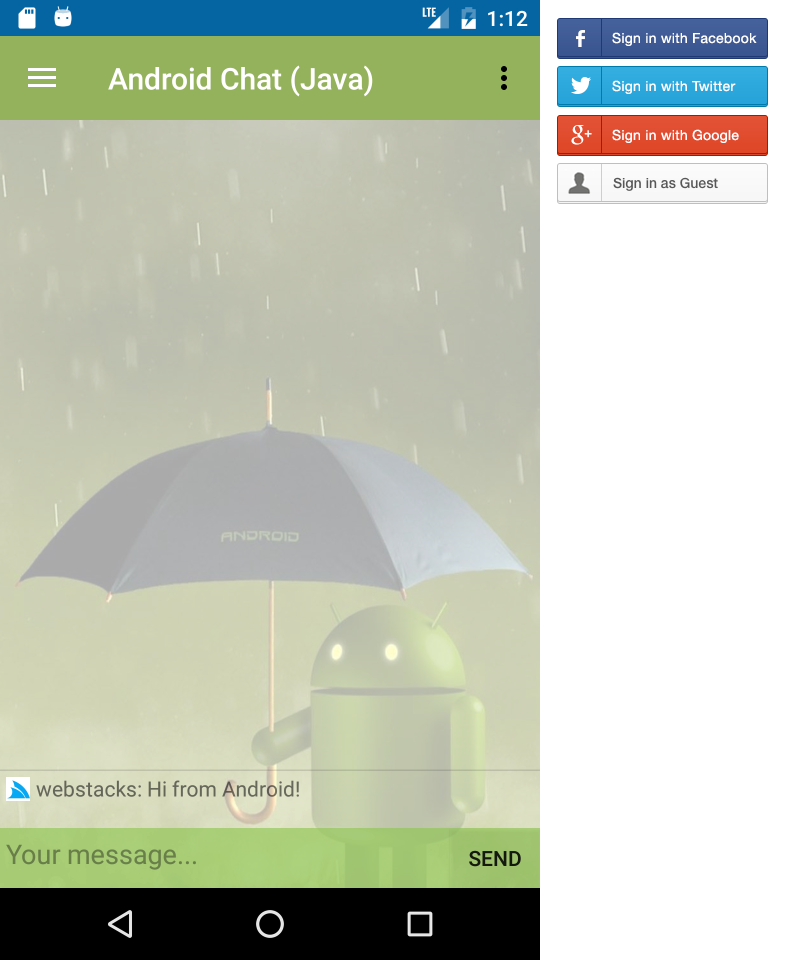](https://github.com/ServiceStackApps/AndroidJavaChat)
## Configuring the Server Events Client
The central hub that powers the Android Chat App is the
[Server Events Client](http://docs.servicestack.net/server-events) connection initially declared in the
[App.java](https://github.com/ServiceStackApps/AndroidJavaChat/blob/master/src/androidchat/app/src/main/java/servicestack/net/androidchat/App.java) Application so its singleton instance is easily accessible from our entire App:
```java
public App(Context context) {
this.context = context;
this.prefs = context.getSharedPreferences("servicestack.net.androidchat",Context.MODE_PRIVATE);
serverEventsClient = new AndroidServerEventsClient("http://chat.servicestack.net/", "home");
}
```
The Server Events connection itself is initialized in
[MainActivity.java](https://github.com/ServiceStackApps/AndroidJavaChat/blob/33431c80d627d806d5002941acb74ef189212661/src/androidchat/app/src/main/java/servicestack/net/androidchat/MainActivity.java#L88) when its first launched, after
selecting how the User wants to Sign-in from the initial Login screen.
The complete Server Events registration below binds the Chat Server Events to our Application logic, where:
1. Upon successful connection:
1. Loads the Chat Message History for the channel
2. Updates our User's Avatar
2. When a new User Joins:
1. Updates the `subscriberList` with a list of all Users in the channel
2. Tell our Message History to re-render because our dataset has changed
3. When the Server Events Connection throws an Exception:
1. Load an Alert dialog with the Error message
4. It uses the Custom `ReceiverResolver` to initialize instances of our Receiver classes
5. Registers `ChatReceiver` to handle all messages sent with `cmd.*` selector
6. Registers `TvReciever` to handle all messages sent with `tv.*` selector
7. Registers `CssReceiver` to handle all messages sent with `css.*` selector
```java
App.get().getServerEventsClient()
.setOnConnect(connectMsg -> {
Extensions.updateChatHistory(getClient(), cmdReceiver, () -> {
Extensions.updateUserProfile(connectMsg, mainActivity);
});
})
.setOnJoin(msg -> {
getClient().getChannelSubscribersAsync(r -> {
subscriberList = r;
messageHistoryAdapter.notifyDataSetChanged();
});
})
.setOnException(error -> mainActivity.runOnUiThread(() ->
Toast.makeText(this, "Error : " + error.getMessage(), Toast.LENGTH_LONG).show()))
.setResolver(new ReceiverResolver(cmdReceiver))
.registerReceiver(ChatReceiver.class)
.registerNamedReceiver("tv", TvReciever.class)
.registerNamedReceiver("css", CssReceiver.class);
```
Later in `onPostCreate()` the ServerEventsClient starts the connection and begins listening to Server Events:
```java
@Override
public void onPostCreate(Bundle savedInstanceState) {
//...
App.get().getServerEventsClient().start();
}
```
### Custom Resolver
In order to inject our receivers their required dependencies we utilize a custom
[ReceiverResolver](https://github.com/ServiceStackApps/AndroidJavaChat/blob/master/src/androidchat/app/src/main/java/servicestack/net/androidchat/ReceiverResolver.java) to take control over how Receiver classes are instantiated:
```java
public class ReceiverResolver implements IResolver {
ChatCommandHandler messageHandler;
public ReceiverResolver(ChatCommandHandler messageHandler) {
this.messageHandler = messageHandler;
}
@Override
public Object TryResolve(Class cls){
if (cls == ChatReceiver.class){
return new ChatReceiver(this.messageHandler);
} else if (cls == TvReciever.class){
return new TvReciever(this.messageHandler);
} else if (cls == CssReceiver.class){
return new CssReceiver(this.messageHandler);
}
try {
return cls.newInstance();
} catch (Exception e) {
throw new RuntimeException(e);
}
}
}
```
### Server Event Receivers
The receiver classes themselves act like light-weight proxies which captures each event and forwards them
to the [ChatCommandHandler](https://github.com/ServiceStackApps/AndroidJavaChat/blob/master/src/androidchat/app/src/main/java/servicestack/net/androidchat/ChatCommandHandler.java) to perform the necessary UI updates:
```java
public class ChatReceiver extends ServerEventReceiver {
private ChatCommandHandler chatMessageHandler;
public ChatReceiver(ChatCommandHandler chatMessageHandler) {
this.chatMessageHandler = chatMessageHandler;
}
public void chat(ChatMessage chatMessage){
chatMessageHandler.appendMessage(chatMessage);
}
public void announce(String message){
chatMessageHandler.announce(message);
}
}
public class CssReceiver extends ServerEventReceiver {
private ChatCommandHandler chatMessageHandler;
public CssReceiver(ChatCommandHandler chatMessageHandler){
this.chatMessageHandler = chatMessageHandler;
}
public void backgroundImage(String message){
chatMessageHandler.changeBackground(message);
}
public void background(String message){
chatMessageHandler.changeBackgroundColor(message, super.getRequest().getCssSelector());
}
}
public class TvReciever extends ServerEventReceiver {
private ChatCommandHandler chatMessageHandler;
public TvReciever(ChatCommandHandler chatMessageHandler) {
this.chatMessageHandler = chatMessageHandler;
}
public void watch(String videoUrl) {
chatMessageHandler.showVideo(videoUrl);
}
}
```
## Integrated Facebook, Twitter and Google Logins
As we're now using Java we get direct access to the latest 3rd Party Android components which we've taken
advantage of to leverage Facebook's and Twitter's SDK's to handle the OAuth flow allowing Users to Sign-in
with their Facebook or Twitter account.
Before we can make use of their SDK's we need to configure them with our project by following their
respective installation guides:
- [Install Facebook SDK](https://developers.facebook.com/docs/android/getting-started#androidstudio)
- [Install Twitter SDK](https://fabric.io/kits/android/twitterkit/install)
- [Install Google SDK](https://developers.google.com/identity/sign-in/android/sign-in)
### Login Activities
As they offer different level of customizations we've implemented 2 Login Activities, our first Activity shows
how to integrate using Facebook's and Twitter's SDK Login buttons whilst the 2nd Login Activity shows how to
use the SDK classes directly letting us use custom images for login buttons.
The UI and implementation for both Login Activities are below:
#### Using Login SDK Buttons
- [login_buttons.xml](https://github.com/ServiceStackApps/AndroidJavaChat/blob/master/src/androidchat/app/src/main/res/layout/login_buttons.xml)
- [LoginButtonsActivity.java](https://github.com/ServiceStackApps/AndroidJavaChat/blob/master/src/androidchat/app/src/main/java/servicestack/net/androidchat/LoginButtonsActivity.java)
#### Using Custom Login Images
- [login.xml](https://github.com/ServiceStackApps/AndroidJavaChat/blob/master/src/androidchat/app/src/main/res/layout/login.xml)
- [LoginActivity.java](https://github.com/ServiceStackApps/AndroidJavaChat/blob/master/src/androidchat/app/src/main/java/servicestack/net/androidchat/LoginActivity.java)
With each Activity declared in [AndroidManifest.xml](https://github.com/ServiceStackApps/AndroidJavaChat/blob/master/src/androidchat/app/src/main/AndroidManifest.xml):
```xml
```
## LoginButtonsActivity
The `` is used to control which Activity our App loads when launched, in this case
it will load the `LoginButtonsActivity`:
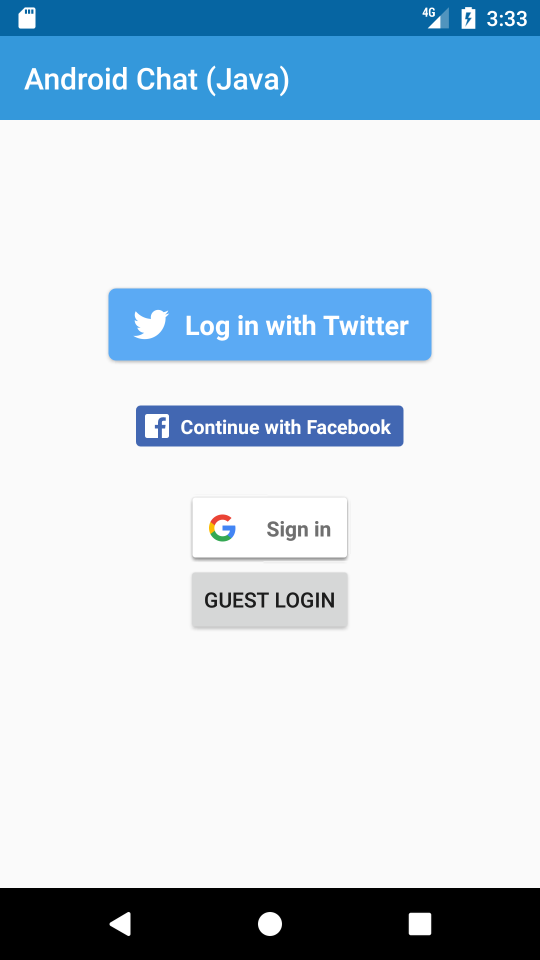
Where we just use Twitter's, Facebook's and Google's Login Button widgets to render the UI in
[login_buttons.xml](https://github.com/ServiceStackApps/AndroidJavaChat/blob/master/src/androidchat/app/src/main/res/layout/login_buttons.xml):
```xml
```
### Signing in with Twitter Login Button
To use the Twitter SDK we need to first configure it with our Twitter App's `ConsumerKey` and `ConsumerSecret`:
```java
Fabric.with(this, new Twitter(new TwitterAuthConfig(
getString(R.string.twitter_key),
getString(R.string.twitter_secret))));
```
> If you don't have a Twitter App, one can be created at [dev.twitter.com/apps](https://dev.twitter.com/apps)
After that it's simply a matter of handling the Twitter `success()` and `failure()` callbacks. When the
`success()` callback is fired it means the User has successfully Signed into our Android App, we then
need to Authenticate with our ServiceStack Chat Server by making an Authenticated request using the
User's Twitter AccessToken and Secret:
```java
btnTwitterLogin = (TwitterLoginButton) findViewById(R.id.btnTwitterLogin);
btnTwitterLogin.setCallback(new Callback() {
@Override
public void success(Result result) {
startProgressBar();
UiHelpers.setStatus(txtStatus, "Local twitter sign-in successful, signing into server...");
TwitterSession session = result.data;
App.get().getServiceClient().postAsync(new dtos.Authenticate()
.setProvider("twitter")
.setAccessToken(session.getAuthToken().token)
.setAccessTokenSecret(session.getAuthToken().secret)
.setRememberMe(true),
r -> {
UiHelpers.setStatus(txtStatus, "Server twitter sign-in successful, opening chat...");
App.get().saveTwitterAccessToken(session.getAuthToken());
Intent intent = new Intent(activity, MainActivity.class);
stopProgressBar();
startActivity(intent);
},
error -> {
UiHelpers.setStatusError(txtStatus, "Server twitter sign-in failed", error);
stopProgressBar();
});
}
@Override
public void failure(TwitterException exception) {
Log.e(exception);
stopProgressBar();
}
});
```
The Server's Typed Request DTO's like `Authenticate` can be generated by adding a
[Java ServiceStack Reference](http://docs.servicestack.net/java-add-servicestack-reference#add-servicestack-reference) to
[chat.servicestack.net](http://chat.servicestack.net).
### ServiceClient Async APIs are executed on Async Tasks
Behind the scenes the `*Async` ServiceClient APIs are executed on an
[Android's AsyncTask](https://developer.android.com/reference/android/os/AsyncTask.html)
where non-blocking HTTP Requests are performed on a background thread whilst their callbacks are
automatically executed on the UI thread so clients are able to update the UI with ServiceClient responses
without needing to marshal their UI updates on the UI Thread.
### Opening an Authenticated Server Events Connection
If the Server Authentication was successful we save the User's AuthToken which we'll use later so the next
time the User launches the App they can automatically sign-in.
Now that the User has authenticated with the Chat Server, the Authenticated
[Session Cookies](http://docs.servicestack.net/sessions) are configured on our Service Client so we can now
open our `MainActivity` and establish an authenticated Server Event connection to the Chat Server.
### Notify SDK Buttons of Activity Completion
An additional callback we need to handle is `onActivityResult()` to notify the Twitter and Facebook Login
buttons that the activity they've launched to capture the User's consent has completed:
```java
@Override
protected void onActivityResult(int requestCode, int resultCode, Intent data) {
super.onActivityResult(requestCode, resultCode, data);
btnTwitterLogin.onActivityResult(requestCode, resultCode, data);
facebookCallback.onActivityResult(requestCode, resultCode, data);
if (requestCode == RC_SIGN_IN) {
handleGoogleSignInResult(Auth.GoogleSignInApi.getSignInResultFromIntent(data));
}
}
```
### Signing in with Facebook Login Button
Facebook's Login button doesn't need us to explicitly specify our Facebook Application Id as it looks for it
in our [AndroidManifest.xml](https://github.com/ServiceStackApps/AndroidJavaChat/blob/master/src/androidchat/app/src/main/AndroidManifest.xml):
```xml
```
> If you don't have a Facebook App, one can be created at [developers.facebook.com/apps](https://developers.facebook.com/apps)
The implementation for Facebook's `LoginButton` follows a similar process to Twitter's where we need to
register a callback on Facebook's Login button to handle its `onSuccess()`, `onCancel()` and `onError()`
callbacks:
```java
facebookCallback = CallbackManager.Factory.create();
btnFacebookLogin = (LoginButton) findViewById(R.id.btnFacebookLogin);
btnFacebookLogin.setReadPermissions("email"); // Ask user for permission to view access email address
btnFacebookLogin.registerCallback(facebookCallback, new FacebookCallback() {
@Override
public void onSuccess(LoginResult loginResult) {
UiHelpers.setStatus(txtStatus, "Local facebook sign-in successful, signing into server...");
App.get().getServiceClient().postAsync(new dtos.Authenticate()
.setProvider("facebook")
.setAccessToken(loginResult.getAccessToken().getToken())
.setRememberMe(true),
r -> {
UiHelpers.setStatus(txtStatus, "Server facebook sign-in successful, opening chat...");
Intent intent = new Intent(activity, MainActivity.class);
stopProgressBar();
startActivity(intent);
},
error -> {
UiHelpers.setStatusError(txtStatus, "Server facebook sign-in failed", error);
stopProgressBar();
});
}
@Override
public void onCancel() {
stopProgressBar();
}
@Override
public void onError(FacebookException exception) {
Log.e(exception);
stopProgressBar();
}
});
```
The Authentication request to our Chat Server is similar to Twitter's except we only need to send 1
AccessToken to Authenticate with the Server and we don't need to explicitly save the User's Access Token
as Facebook's SDK does this for us behind the scenes.
### Login with Google SignIn Button
Whilst the sign-in process is similar, Google SignIn requires more effort to setup as you're left with
implementing a lot of the mechanics yourself starting with having to choose an arbitrary Request Code
which you'll need to use to manually check when the Google SignIn Activity has completed, this can
be any number, e.g:
```java
private static final int RC_SIGN_IN = 9001; //Arbitrary Request Code
```
We'll then need to configure your preferred `GoogleSignInOptions`, as we want to be able to retrieve the
User's AccessToken we need to popoulate `requestServerAuthCode()` with our Google OAuth App Id:
> If you don't have a Google App, one can be created at [console.developers.google.com/apis/credentials](https://console.developers.google.com/apis/credentials)
```java
SignInButton btnGoogleSignIn = (SignInButton) findViewById(R.id.sign_in_button);
GoogleSignInOptions gso = new GoogleSignInOptions.Builder(GoogleSignInOptions.DEFAULT_SIGN_IN)
.requestEmail()
.requestServerAuthCode(getResources().getString(R.string.google_key))
.build();
googleApiClient = new GoogleApiClient.Builder(this)
.enableAutoManage(this, r -> { /* Handle On Connection Failed...*/ })
.addApi(Auth.GOOGLE_SIGN_IN_API, gso)
.build();
btnGoogleSignIn.setOnClickListener(v -> {
Intent signInIntent = Auth.GoogleSignInApi.getSignInIntent(googleApiClient);
startActivityForResult(signInIntent, RC_SIGN_IN);
});
```
We use that to configure a `GoogleApiClient` and then manually bind Google's `SignInButton` click handler
to launch a new SignIn Intent with our custom `RC_SIGN_IN`.
Once the User has authorized with Google we're notified in `onActivityResult()` which gets called back
with our custom `RC_SIGN_IN` to let us know we can process the Google SignIn Result:
```java
@Override
protected void onActivityResult(int requestCode, int resultCode, Intent data) {
//...
if (requestCode == RC_SIGN_IN) {
handleGoogleSignInResult(Auth.GoogleSignInApi.getSignInResultFromIntent(data));
}
}
```
If the `GoogleSignInResult` was successful the User has Signed in locally to our App at that point but
as we need to Authenticate the User with the Chat Server we also need to retrieve their AccessToken.
Unfortunately Google only returns us a Server Auth Code which we need to use to call another Google API,
passing in our OAuth App Secret to get the User's AccessToken for our App:
```java
private void handleGoogleSignInResult(GoogleSignInResult result) {
if (result.isSuccess()) {
GoogleSignInAccount acct = result.getSignInAccount();
UiHelpers.setStatus(txtStatus, "Local google sign-in successful, signing into server...");
Activity activity = this;
OkHttpClient client = new OkHttpClient();
RequestBody requestBody = new FormBody.Builder()
.add("grant_type", "authorization_code")
.add("client_id", getResources().getString(R.string.google_key))
.add("client_secret", getResources().getString(R.string.google_secret))
.add("redirect_uri","")
.add("code", acct.getServerAuthCode())
.build();
Request request = new Request.Builder()
.url("https://www.googleapis.com/oauth2/v4/token")
.post(requestBody)
.build();
client.newCall(request).enqueue(new okhttp3.Callback() {
@Override
public void onFailure(Call call, IOException e) {
UiHelpers.setStatus(txtStatus, "Failed to retrieve AccessToken from Google");
}
@Override
public void onResponse(Call call, Response response) throws IOException {
String json = response.body().string();
JsonObject obj = JsonUtils.toJsonObject(json);
String accessToken = obj.get("access_token").getAsString();
App.get().saveGoogleAccessToken(accessToken);
App.get().getServiceClient().postAsync(new dtos.Authenticate()
.setProvider("GoogleOAuth")
.setAccessToken(accessToken)
.setRememberMe(true),
r -> {
UiHelpers.setStatus(txtStatus, "Server google sign-in successful, opening chat...");
stopProgressBar();
startActivity(new Intent(activity, MainActivity.class));
},
error -> {
UiHelpers.setStatusError(txtStatus, "Server google sign-in failed", error);
stopProgressBar();
});
}
});
}
}
```
Once we retrieve the `accessToken` the process is similar to Twitter's where we save the `AccessToken`
to allow auto-SignIn's on restarts of our App, we then use the `accessToken` to Authenticate with the
Chat Server before loading the `MainActivity` to establish our Authenticated Server Events connection.
### Anonymous Sign In
If the User doesn't have a Twitter or Facebook account we also let them login as a guest by skipping
Authentication with the Chat Server and open the `MainActivity` where they'll connect as an
(Unauthenticated) anonymous user:
```java
Button btnGuestLogin = (Button)findViewById(R.id.btnGuestLogin);
btnGuestLogin.setOnClickListener(view -> {
UiHelpers.setStatus(txtStatus, "Opening chat as guest...");
App.get().getServiceClient().clearCookies();
Intent intent = new Intent(this, MainActivity.class);
startActivity(intent);
});
```
### Automatically Sign-In previously Signed In Users
Another feature that's easily implemented is automatically signing in Users who've previously Signed-in and had their AccessToken saved which is done for both Twitter and Facebook with the code below:
```java
dtos.Authenticate authDto = App.get().getSavedAccessToken();
if (authDto != null){
UiHelpers.setStatus(txtStatus, "Signing in with saved " + authDto.getProvider() + " AccessToken...");
App.get().getServiceClient().postAsync(authDto,
r -> {
Intent intent = new Intent(activity, MainActivity.class);
stopProgressBar();
startActivity(intent);
},
error -> {
UiHelpers.setStatusError(txtStatus,
"Error logging into " + authDto.getProvider() + " using Saved AccessToken", error);
stopProgressBar();
});
}
```
Which asks our [App singleton](https://github.com/ServiceStackApps/AndroidJavaChat/blob/master/src/androidchat/app/src/main/java/servicestack/net/androidchat/App.java) to return a populated `Authenticate` Request DTO if the User had previously
had their AccessToken saved.
For Facebook we can query `AccessToken.getCurrentAccessToken()` to check for an existing AccessToken
whilst for Twitter and Google we check the Users `SharedPreferences` which we manage ourselves:
```java
public dtos.Authenticate getSavedAccessToken(){
AccessToken facebookAccessToken = AccessToken.getCurrentAccessToken();
if (facebookAccessToken != null){
return new dtos.Authenticate()
.setProvider("facebook")
.setAccessToken(facebookAccessToken.getToken())
.setRememberMe(true);
}
String googleAccessToken = prefs.getString("google.AccessToken", null);
if (googleAccessToken != null){
return new dtos.Authenticate()
.setProvider("GoogleOAuth")
.setAccessToken(googleAccessToken)
.setRememberMe(true);
}
String twitterAccessToken = prefs.getString("twitter.AccessToken", null);
String twitterAccessSecret = prefs.getString("twitter.AccessTokenSecret", null);
if (twitterAccessToken == null || twitterAccessSecret == null)
return null;
return new dtos.Authenticate()
.setProvider("twitter")
.setAccessToken(twitterAccessToken)
.setAccessTokenSecret(twitterAccessSecret)
.setRememberMe(true);
}
public void saveTwitterAccessToken(TwitterAuthToken authToken){
SharedPreferences.Editor editor = prefs.edit();
editor.putString("twitter.AccessToken", authToken.token);
editor.putString("twitter.AccessTokenSecret", authToken.secret);
editor.apply();
}
public void saveGoogleAccessToken(String accessToken){
SharedPreferences.Editor editor = prefs.edit();
editor.putString("google.AccessToken", accessToken);
editor.apply();
}
```
## LoginActivity
The [LoginActivity](https://github.com/ServiceStackApps/AndroidJavaChat/blob/master/src/androidchat/app/src/main/java/servicestack/net/androidchat/LoginActivity.java)
screen shows an example of using custom vector images for Sign In buttons. Clicking on the **Logout** Menu
Item on the **Top Right Menu** or sending the `/logout` text message will launch the `LoginActivity`:
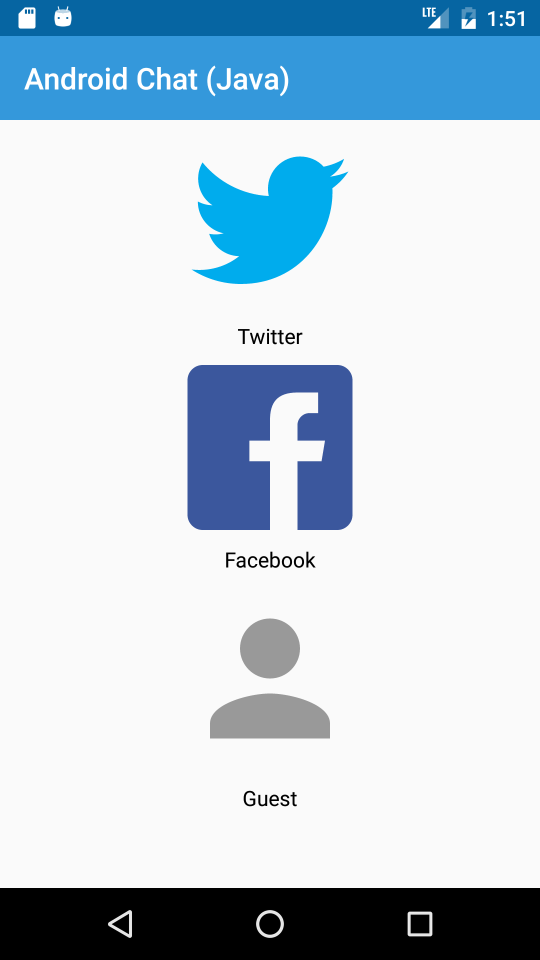
As they look nicer in all resolutions the LoginActivity uses Vectors for its Image Buttons:
- [ic_twitter_logo_blue.xml](https://github.com/ServiceStackApps/AndroidJavaChat/blob/master/src/androidchat/app/src/main/res/drawable/ic_twitter_logo_blue.xml)
- [ic_facebook_logo.xml](https://github.com/ServiceStackApps/AndroidJavaChat/blob/master/src/androidchat/app/src/main/res/drawable/ic_facebook_logo.xml)
- [ic_no_profile.xml](https://github.com/ServiceStackApps/AndroidJavaChat/blob/master/src/androidchat/app/src/main/res/drawable/ic_no_profile.xml)
Which are referenced in backgrounds of custom `ImageButton` in the Activity's
[login.xml](https://github.com/ServiceStackApps/AndroidJavaChat/blob/master/src/androidchat/app/src/main/res/layout/login.xml) layout:
```xml
```
### Signing in with Custom Twitter Image Button
We then assign a click handler on the `ImageButton` which uses the `TwitterAuthClient` directly to
initiate the OAuth flow for capturing our Users sign-in AccessToken which we can handle in the same
`success()` callback to Authenticate with the Chat Server:
```java
ImageButton btnTwitter = (ImageButton)findViewById(R.id.btnTwitter);
twitterAuth = new TwitterAuthClient();
btnTwitter.setOnClickListener(view -> {
startProgressBar();
twitterAuth.authorize(activity, new Callback() {
@Override
public void success(Result result) {
UiHelpers.setStatus(txtStatus, "Local twitter sign-in successful, signing into server...");
TwitterSession session = result.data;
App.get().getServiceClient().postAsync(new dtos.Authenticate()
.setProvider("twitter")
.setAccessToken(session.getAuthToken().token)
.setAccessTokenSecret(session.getAuthToken().secret)
.setRememberMe(true),
r -> {
UiHelpers.setStatus(txtStatus, "Server twitter sign-in successful, opening chat...");
App.get().saveTwitterAccessToken(session.getAuthToken());
Intent intent = new Intent(activity, MainActivity.class);
stopProgressBar();
startActivity(intent);
},
error -> {
UiHelpers.setStatusError(txtStatus, "Server twitter sign-in failed", error);
stopProgressBar();
});
}
@Override
public void failure(TwitterException exception) {
exception.printStackTrace();
stopProgressBar();
}
});
});
```
### Signing in with Custom Facebook Image Button
To enable custom Sign-ins with Facebook we need to use its `LoginManager` singleton instance to register our
callback and initiate the User's OAuth Sign-in flow:
```java
facebookCallback = CallbackManager.Factory.create();
LoginManager.getInstance().registerCallback(facebookCallback, new FacebookCallback() {
@Override
public void onSuccess(LoginResult loginResult) {
UiHelpers.setStatus(txtStatus, "Local facebook sign-in successful, signing into server...");
App.get().getServiceClient().postAsync(new dtos.Authenticate()
.setProvider("facebook")
.setAccessToken(loginResult.getAccessToken().getToken())
.setRememberMe(true),
r -> {
UiHelpers.setStatus(txtStatus, "Server facebook sign-in successful, opening chat...");
Intent intent = new Intent(activity, MainActivity.class);
stopProgressBar();
startActivity(intent);
},
error -> {
UiHelpers.setStatusError(txtStatus, "Server facebook sign-in failed", error);
stopProgressBar();
});
}
@Override
public void onCancel() {
stopProgressBar();
}
@Override
public void onError(FacebookException exception) {
Log.e(exception);
stopProgressBar();
}
});
ImageButton btnFacebook = (ImageButton)findViewById(R.id.btnFacebook);
btnFacebook.setOnClickListener(view -> {
startProgressBar();
LoginManager.getInstance().logInWithReadPermissions(this, Arrays.asList("email"));
});
```
We also need to remember to notify the `twitterAuth` and `facebookCallback` that their Sign In Activities
have completed in our overridden `onActivityResult()`:
```java
@Override
protected void onActivityResult(int requestCode, int resultCode, Intent data) {
super.onActivityResult(requestCode, resultCode, data);
twitterAuth.onActivityResult(requestCode, resultCode, data);
facebookCallback.onActivityResult(requestCode, resultCode, data);
}
```
### Async Utils
Non-blocking requests with Async Tasks are particularly nice in Java Android as they're performed on a
background thread with responses transparently executed on the UI Thread enabling a simple UX-friendly
programming model without suffering the same [uncomposable viral nature of C#'s async](http://journal.stuffwithstuff.com/2015/02/01/what-color-is-your-function/).
This makes it easy to perform non-blocking tasks in Android and update UI widgets with their response as
visible when loading Bitmaps which can directly update UI Widgets with a Java 8 lambda or method reference:
```java
public void changeBackground(String message)
{
String url = message.startsWith("url(") ? message.substring(4, message.length() - 1) : message;
ImageView chatBackground = (ImageView)parentActivity.findViewById(R.id.chat_background);
App.get().readBitmap(url, chatBackground::setImageBitmap);
}
```
Which calls the simple LRU Cache in
[App.java](https://github.com/ServiceStackApps/AndroidJavaChat/blob/master/src/androidchat/app/src/main/java/servicestack/net/androidchat/App.java) that leverages ServiceStack's `AsyncUtils.readBitmap()` to download images from
URLs into Bitmaps:
```java
private LruCache bitmapCache = new LruCache(4 * 1024 * 1024) {// 4MiB
protected int sizeOf(String key, Bitmap value) {
return value.getByteCount();
}
};
public void readBitmap(final String url, final AsyncSuccess success){
Bitmap cachedBitmap = (Bitmap)bitmapCache.get(url);
if (cachedBitmap != null){
success.success(cachedBitmap);
return;
}
AsyncUtils.readBitmap(url, imageBitmap -> {
bitmapCache.put(url, imageBitmap);
success.success(imageBitmap);
},
Throwable::printStackTrace);
}
```
## Find out more
For more info on ServiceStack's Java support utilized in this example checkout:
- [Java Add Servicestack Reference](http://docs.servicestack.net/java-add-servicestack-reference)
- [Java Server Events Client](http://docs.servicestack.net/java-server-events-client)