|
| 1 | +[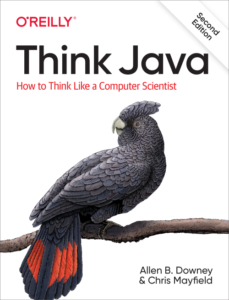](https://greenteapress.com/wp/think-java-2e/) |
| 2 | + |
1 | 3 | # ThinkJavaCode2 |
2 | | -Supporting code for Think Java, 2nd edition. |
3 | | -Copyright (c) 2020 Allen B. Downey and Chris Mayfield. |
| 4 | + |
| 5 | +Supporting code for Think Java, 2nd edition. |
| 6 | +Copyright (c) 2020 Allen B. Downey and Chris Mayfield. |
4 | 7 | This edition was published in December 2019 by [O'Reilly Media](https://www.oreilly.com/library/view/think-java-2nd/9781492072492/) (ISBN 9781492072508). |
5 | 8 |
|
6 | | -This repository contains the code examples from the book and starter code for some exercises. |
7 | | -There are several ways you can work with the code: |
| 9 | +## Source Code |
| 10 | + |
| 11 | +This repository contains the code examples from the book and starter code for some exercises. Below are several ways you can work with the code. |
| 12 | + |
| 13 | +### Using Git (Recommended) |
| 14 | + |
| 15 | +Using Git to work with the repository is a great way to get into the habit of using Git, which is used by software developers around the globe. Here's how you can use Git to use the source code: |
8 | 16 |
|
9 | | -* You can create a copy of this repository on GitHub by clicking the "Fork" button. |
10 | | -If you don't already have a GitHub account, you'll need to create one. |
11 | | -After forking, you'll have your own repository on GitHub that you can use to keep track of code you write. |
12 | | -Then you can "clone" the repository, which downloads a copy of the files to your computer. |
| 17 | +- You can create a copy of this repository on GitHub by clicking the "Fork" button. |
| 18 | + - If you don't already have a GitHub account, you'll need to create one. |
| 19 | + - After forking, you'll have your own repository on GitHub that you can use to keep track of code you write. |
| 20 | + - Then you can "clone" the repository, which downloads a copy of the files to your computer. |
13 | 21 |
|
14 | | -* Alternatively, you could clone the original repository without forking. |
15 | | -If you choose this option, you don't need a GitHub account, but you won't be able to save your changes on GitHub. |
| 22 | +- Alternatively, you could clone the original repository without forking. |
| 23 | + - If you choose this option, you don't need a GitHub account, but you won't be able to save your changes on GitHub. |
16 | 24 |
|
17 | | -* If you don't want to use Git at all, you can download the code in a ZIP archive using the "Clone or download" button, or this link: https://thinkjava.org/code2zip. |
| 25 | +### Download as ZIP |
18 | 26 |
|
19 | | -To clone a repository, you need Git installed on your computer (see https://help.github.com/). |
| 27 | +If you don't want to use Git at all, you can download the code in a ZIP archive using the "Clone or download" button, or this link: [https://thinkjava.org/code2zip](https://thinkjava.org/code2zip). |
| 28 | + |
| 29 | +## Cloning the Repository |
| 30 | + |
| 31 | +To clone a repository, you need Git installed on your computer (see [https://help.github.com/](https://help.github.com/)). |
20 | 32 | If you use Git from the command line, you can clone the original repository like this: |
21 | 33 |
|
22 | | - git clone https://github.com/ChrisMayfield/ThinkJavaCode2.git |
| 34 | +```cmd |
| 35 | +git clone https://github.com/ChrisMayfield/ThinkJavaCode2.git |
| 36 | +``` |
| 37 | + |
| 38 | +## Working with the Code |
23 | 39 |
|
24 | 40 | After you clone the repository or unzip the ZIP file, you should have a directory named `ThinkJavaCode2` with a subdirectory for each chapter in the book. |
25 | 41 |
|
26 | | -The examples in this book were developed and tested using OpenJDK 11. |
27 | | -If you are using a more recent version, everything should still work. |
28 | | -If you are using an older version, some of the examples might not. |
| 42 | +A few notes about the source code regarding what Java version you should use: |
| 43 | + |
| 44 | +- The examples in this book were developed and tested using OpenJDK 11. |
| 45 | +- If you are using a more recent version, everything should still work. |
| 46 | +- If you are using an older version, some of the examples might not. |
| 47 | + |
| 48 | +There are a few ways you can work with the code: |
| 49 | + |
| 50 | +### jGRASP |
| 51 | + |
| 52 | +[jGRASP](https://www.jgrasp.org/) is an IDE used by beginners who are just getting started with Java. It isn't as sophisticated as Eclipse or IntelliJ IDEA, but it has enough features to begin learning Java without feeling too overwhelmed. |
| 53 | + |
| 54 | +- To open the source code in jGRASP, simply open jGRASP in the `ThinkJavaCode2` folder, or navigate to that folder in jGRASP's sidebar explorer. From there, you should be able to open the different `.java` files within the respository. You do not need to worry about the `.checkstyle`, `.classpath`, `.project`, or `*.iml` files. |
| 55 | + |
| 56 | +### Eclipse |
| 57 | + |
| 58 | +[Eclipse](https://www.eclipse.org/) is another IDE used by beginners and professionals alike, and is more feature-rich than jGRASP. |
| 59 | + |
| 60 | +- To open the source code in Eclipse, change your workspace to the `ThinkJavaCode2` folder. Eclipse should automatically detect the different chapter folders as projects and should add them accordingly. You do not need to worry about the `*.iml` file in each folder. |
| 61 | + |
| 62 | +### IntelliJ IDEA |
| 63 | + |
| 64 | +[IntelliJ IDEA](https://www.jetbrains.com/idea/) is an IDE mainly used by professionals or ambitious beginners. It's not recommended for beginners to use this IDE due to how convoluded the user interface can be, but it is a great tool down the line of Java development. |
29 | 65 |
|
| 66 | +- To open the source code in IntelliJ IDEA, open the `ThinkJavaCode2` folder as a project, as it has already been pre-configured as a project. Each of the chapter folders have been labeled as modules, so you can work with the code in each one as if they were a different project, similar to an Eclipse workspace. |
0 commit comments